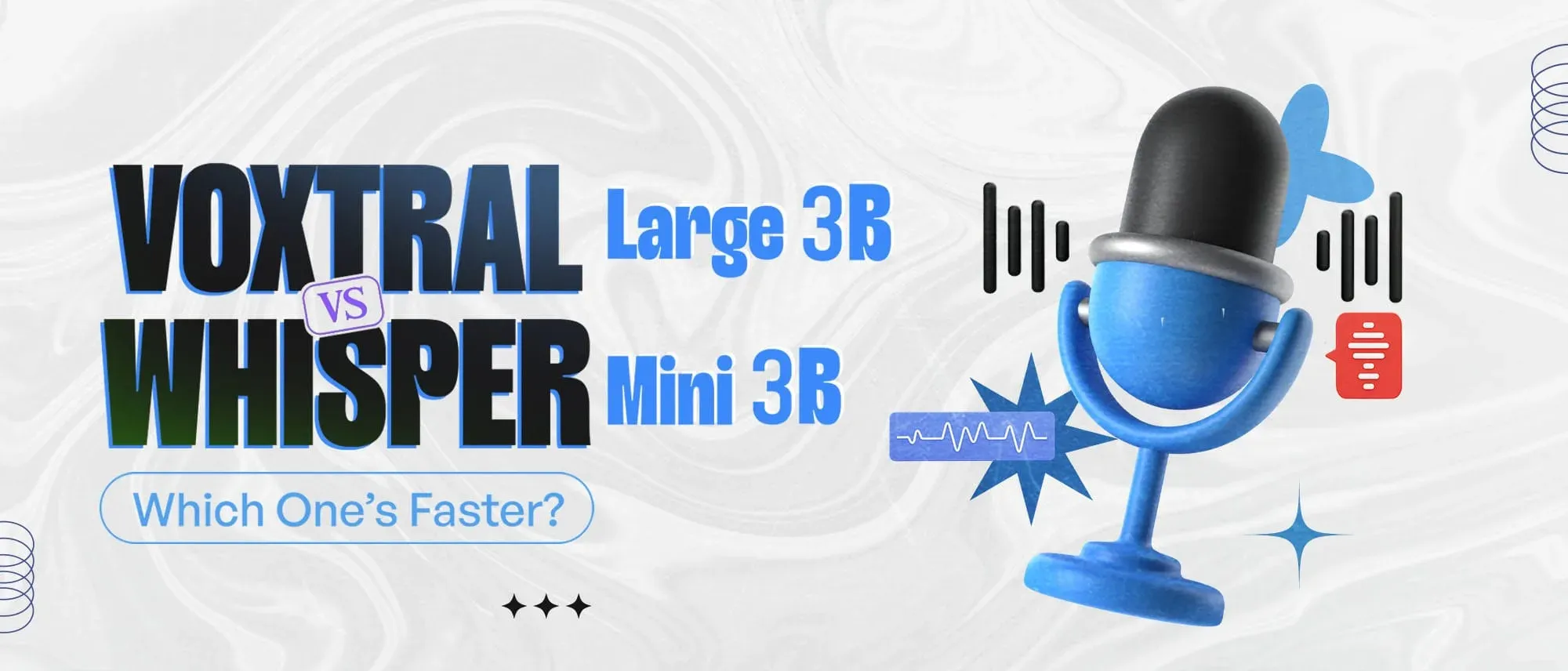
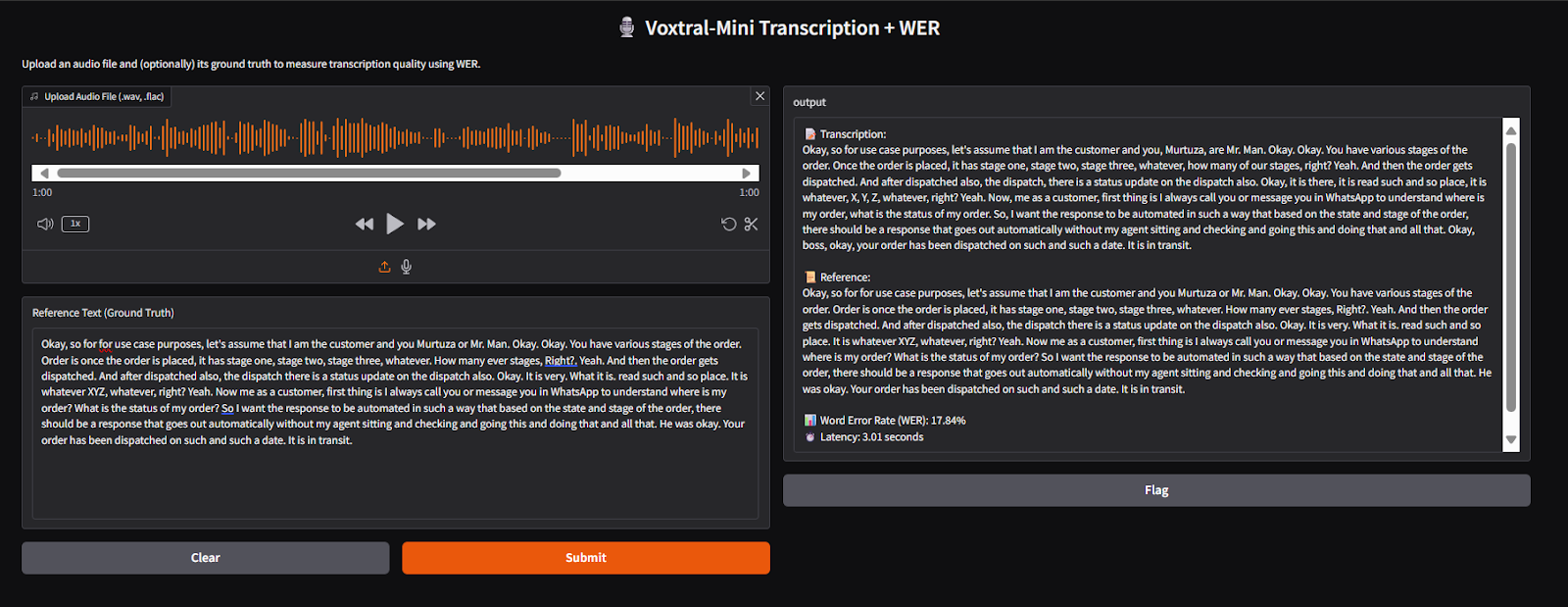
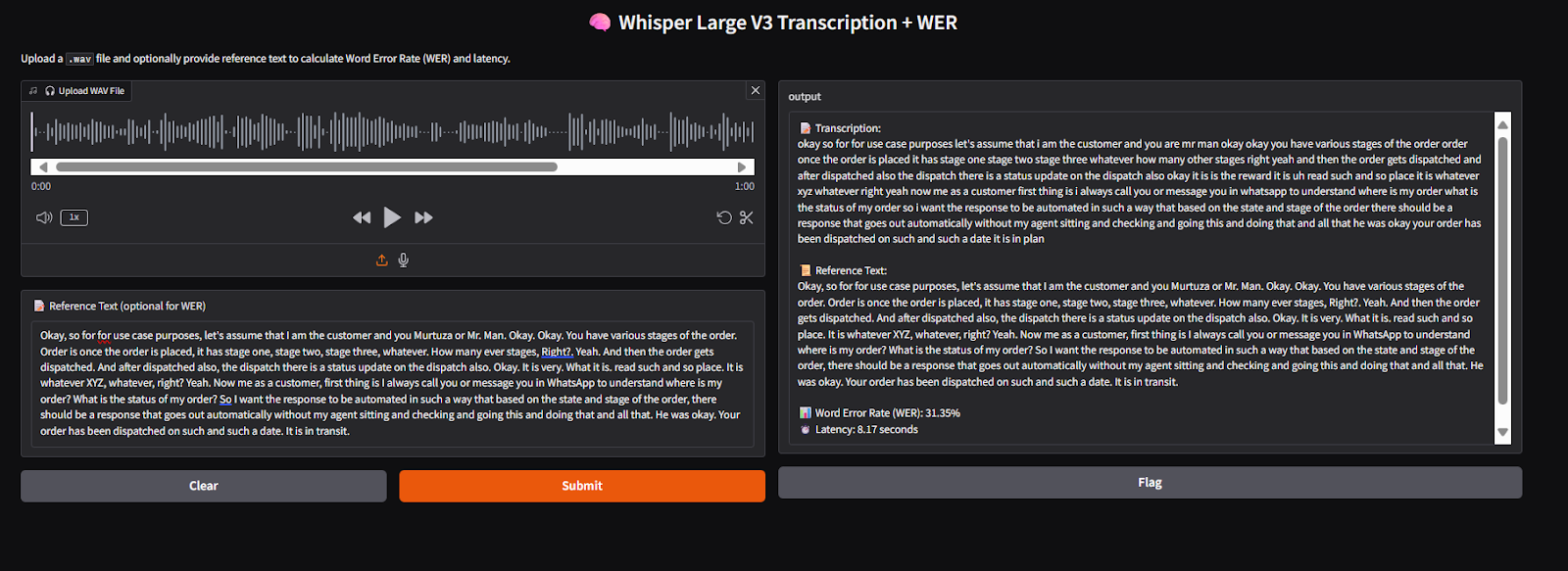
- In the reported test, Voxtral-Mini 3B transcribed one minute of audio in 3.01 seconds, compared with 8.17 seconds for Whisper Large V3.
- Voxtral also recorded the lower word error rate: 17.84% versus 31.35%.Whisper used considerably less GPU memory in the test: approximately 5.1 GB versus 21.2 GB.
- Voxtral is better suited to faster transcription and audio-understanding tasks such as summarisation and voice-based Q&A.
- Whisper remains the stronger option when broader multilingual support and lower hardware requirements matter.
- Present these findings as results from this specific benchmark, not universal rankings. Add the GPU model, audio characteristics, precision, software versions, warm-up method, and number of test runs so readers can evaluate the comparison properly.
Which speech-to-text model delivers faster and more accurate transcriptions: Voxtral-Mini 3B or Whisper Large V3?
I ran this comparison because choosing a speech-to-text model often feels unclear once you move beyond documentation and into real usage. Using the same audio clips, I tested Voxtral-Mini 3B and Whisper Large V3 side by side, focusing on latency (speed) and word error rate (accuracy) to understand how they actually perform in scenarios like calls, meetings, and voice messages.
As speech-to-text systems become more capable, I’ve seen them change how teams handle conversations, recordings, and support workflows. But not every model behaves the same once latency and accuracy start to matter. This comparison breaks down how Voxtral and Whisper stack up in practice, so you can decide which one fits your voice-enabled use case better.
What Is Voxtral-Mini 3B?
Voxtral-Mini 3B is a speech-to-text model that converts spoken audio into written text. While testing it, I focused on how well it balances speed and accuracy, especially given that it’s designed to be relatively lightweight. One thing that stood out is that it doesn’t just transcribe audio but can also follow instructions and produce more structured outputs.
Despite being smaller than many large speech models, it performed better than I initially expected. That makes it a practical option for applications where fast and reliable transcription really matters.
Usage Setup
Here’s the setup I used to run Voxtral-Mini 3B in a Python environment using vLLM, which helped keep latency low during testing.
Setting up Voxtral-Mini 3B is simple if you're using Python. The model is built to work well with vLLm, a fast and efficient backend for running large language models, especially with audio input.
Requirements
- A GPU with at least 9.5 GB of memory (recommended: A100 or similar)
- Python installed
- vLLM installed with audio support
Installation Steps
Use the following command to install vLLM along with audio support:
uv pip install -U "vllm[audio]" --torch-backend=auto --extra-index-url https://wheels.vllm.ai/nightly
Running Voxtral-Mini as a Server
Once installed, you can start serving the model using:
vllm serve mistralai/Voxtral-Mini-3B-2507 --tokenizer_mode mistral --config_format mistral --load_format mistral
This setup allowed me to send audio to the model and receive transcriptions, along with summaries or responses derived directly from the audio.

Walk away with actionable insights on AI adoption.
Limited seats available!

Usage Code
import gradio as gr
import time
from jiwer import wer
from mistral_common.audio import Audio
from mistral_common.protocol.instruct.messages import RawAudio
from mistral_common.protocol.transcription.request import TranscriptionRequest
from openai import OpenAI

client = OpenAI(
    api_key="EMPTY",
    base_url="http://localhost:8000/v1"
)

def transcribe_with_latency_and_wer(audio_file, reference_text):
    start_time = time.time()

    # Load audio file (must be supported format like wav/flac/ogg)
    audio = Audio.from_file(audio_file, strict=False)
    raw_audio = RawAudio.from_audio(audio)

    # Transcribe
    model_id = client.models.list().data[0].id
    request = TranscriptionRequest(
        model=model_id,
        audio=raw_audio,
        language="en",
        temperature=0.0
    ).to_openai(exclude=("top_p", "seed"))

    response = client.audio.transcriptions.create(**request)

    end_time = time.time()
    latency = end_time - start_time
    hypothesis = response.text.strip()

    # Compute WER
    reference = reference_text.strip()
    error = wer(reference, hypothesis) if reference else "N/A"
    return f"""📝 Transcription:\n{hypothesis}
📜 Reference:\n{reference}
📊 Word Error Rate (WER): {error if error == "N/A" else f"{error*100:.2f}%"}
⏱️ Latency: {latency:.2f} seconds
"""
# Gradio interface with reference text input
gr.Interface(
    fn=transcribe_with_latency_and_wer,
    inputs=[
        gr.Audio(type="filepath", label="Upload Audio File (.wav, .flac)"),
        gr.Textbox(label="Reference Text (Ground Truth)", placeholder="Enter the expected text here...")
    ],
    outputs="text",
    title="🎙️ Voxtral-Mini Transcription + WER",
    description="Upload an audio file and (optionally) its ground truth to measure transcription quality using WER."
).launch()
What Is Whisper Large V3?
Whisper Large V3 is a speech-to-text model developed by OpenAI. I’ve used it primarily for its strong multilingual support and ability to handle noisy audio, which is why it’s commonly used for subtitles, voice notes, and meeting transcriptions.
Model Comparison: Voxtral-Mini 3B vs Whisper Large V3
To see which model performs better, I tested both on the same audio clips and compared them based on two key things:
- Latency: How quickly the model returns a transcription
- WER (Word Error Rate): How many transcription errors appear compared to the reference text
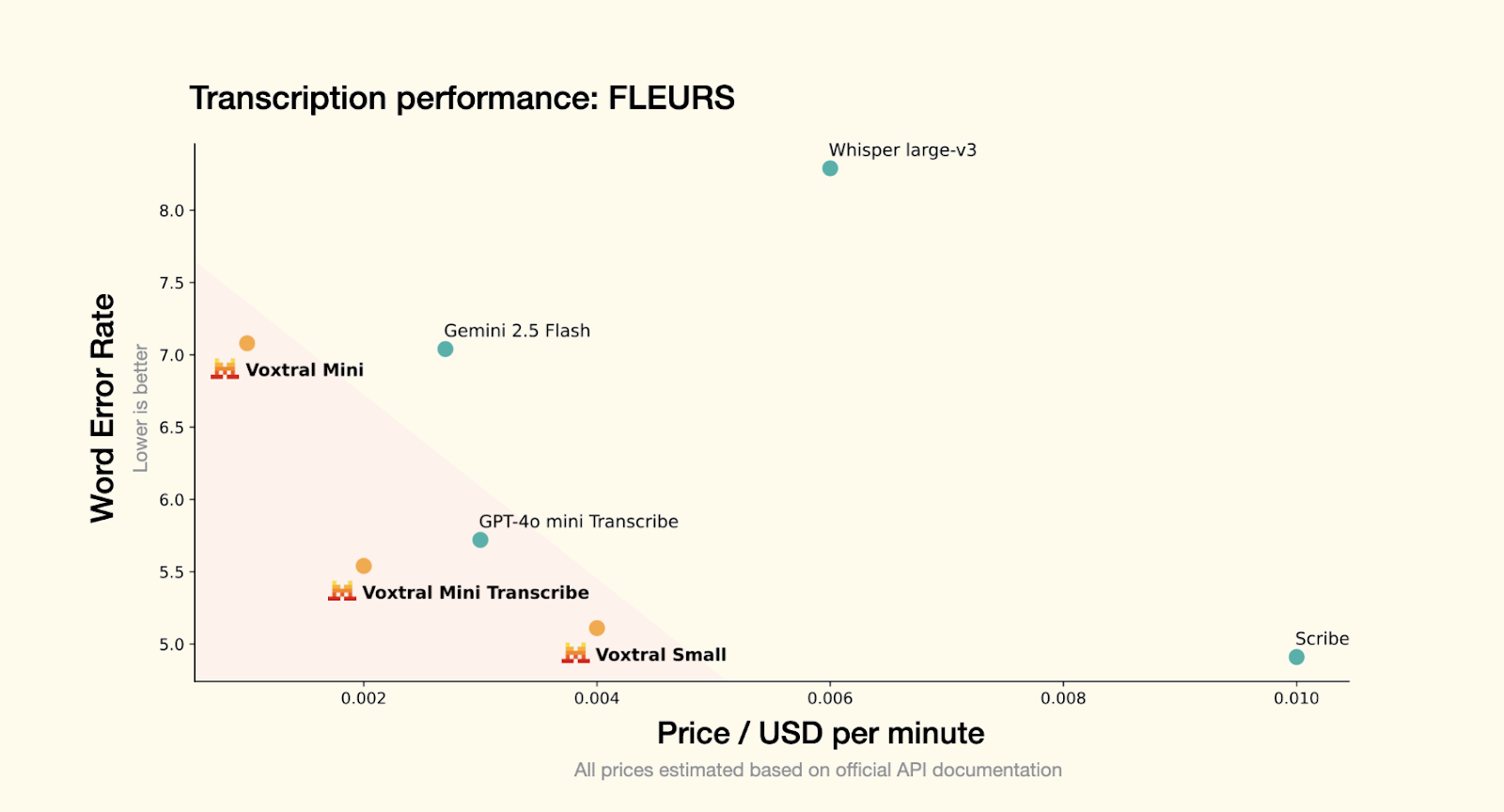
https://mistral.ai/news/voxtral
Speech Transcription:
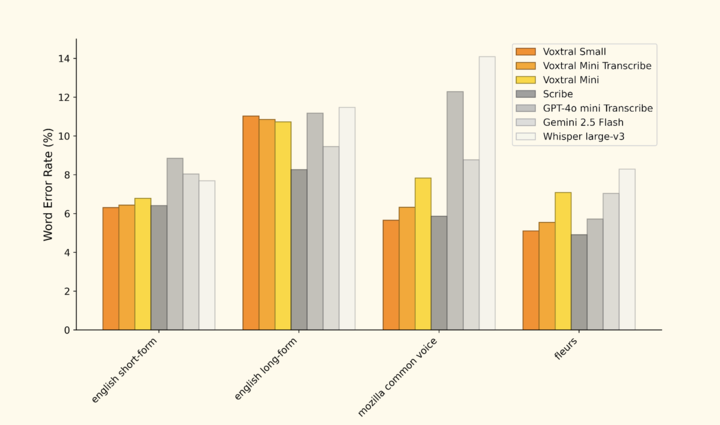
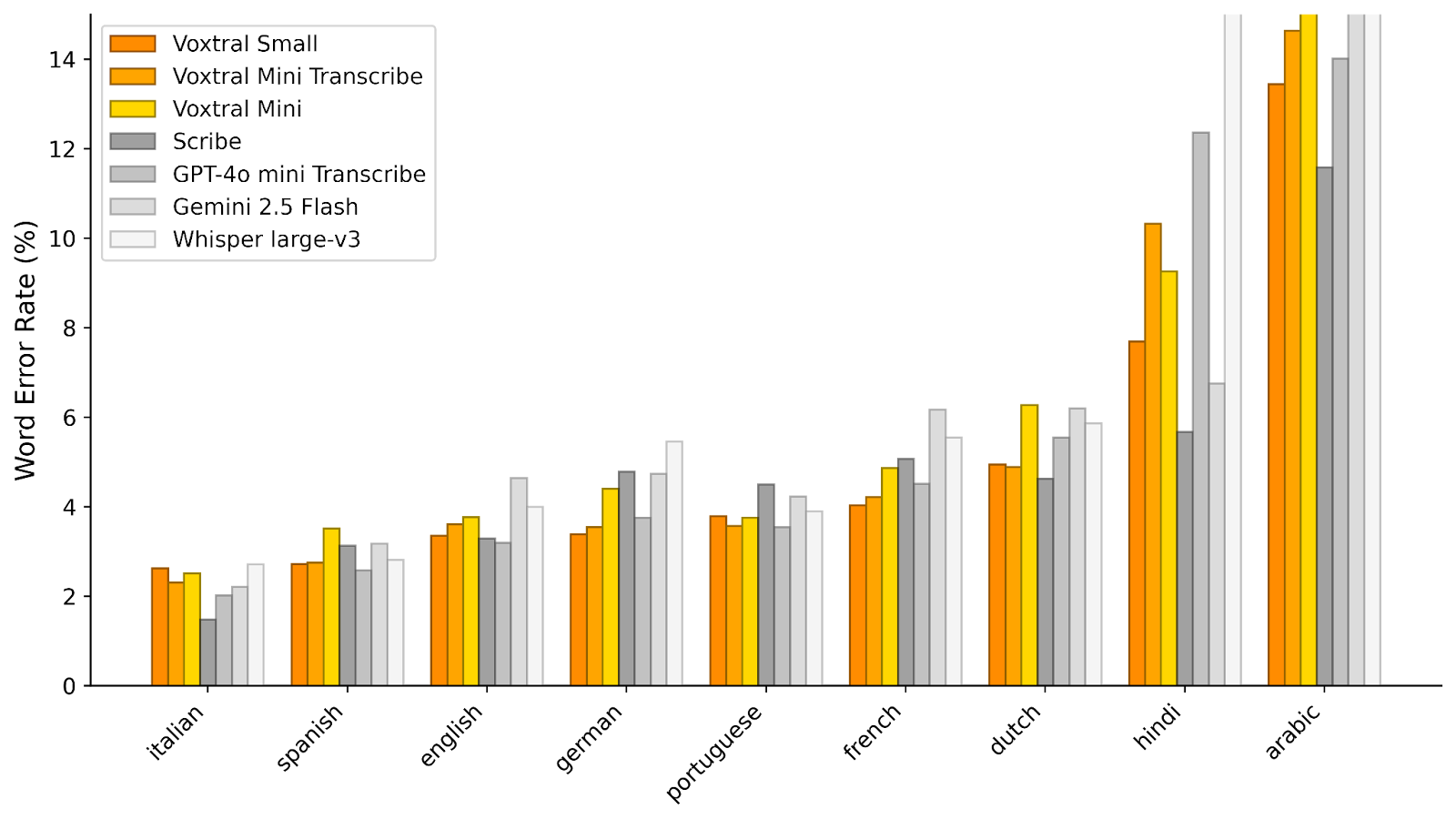
https://mistral.ai/news/voxtral
Result Table
| Feature | Whisper Large V3 | Voxtral-Mini 3B |
1-minute audio latency | 8.17 seconds | 3.01 seconds |
WER (Word Error Rate) | 31.35% | 17.84% |
GPU Memory Used | ~5.1 GB | ~21.2 GB |
Language Support | 50+ languages | 8 major languages |
Extra Features | Basic transcription | Transcription + summarization + Q&A from voice |
Conclusion
From my testing, Voxtral-Mini 3B clearly stood out for speed and transcription quality, returning results much faster while also achieving a lower word error rate. Features like audio summarization and voice-based Q&A make Voxtral-Mini 3B useful for voice AI development beyond basic transcription.
Walk away with actionable insights on AI adoption.
Limited seats available!
Whisper Large V3 remains a strong and trusted option, especially for multilingual transcription and handling difficult or noisy audio. If you need faster, feature-rich performance, Voxtral-Mini 3B is the stronger pick. If broader language support matters most, Whisper Large V3 still holds strong value.
Frequently Asked Questions
1. Which is faster: Voxtral-Mini 3B or Whisper Large V3?
Based on the benchmark, Voxtral-Mini 3B was faster, transcribing one-minute audio in 3.01 seconds compared with Whisper Large V3 at 8.17 seconds.
2. Which model is more accurate?
Voxtral-Mini 3B showed a lower word error rate at 17.84%, while Whisper Large V3 recorded 31.35% in this comparison test.
3. Which uses less GPU memory?
Whisper Large V3 used around 5.1 GB of GPU memory, while Voxtral-Mini 3B required about 21.2 GB during testing.
4. Which model should you choose?
Choose Voxtral-Mini 3B for faster transcription and extra voice features. Choose Whisper Large V3 for wider multilingual support and lower hardware requirements.

Walk away with actionable insights on AI adoption.
Limited seats available!