- vLLM is an open-source inference and serving engine designed to run large language models with higher throughput and more efficient GPU-memory usage.
- Its main optimizations include PagedAttention, continuous batching, efficient KV-cache management, quantization support, and OpenAI-compatible APIs.
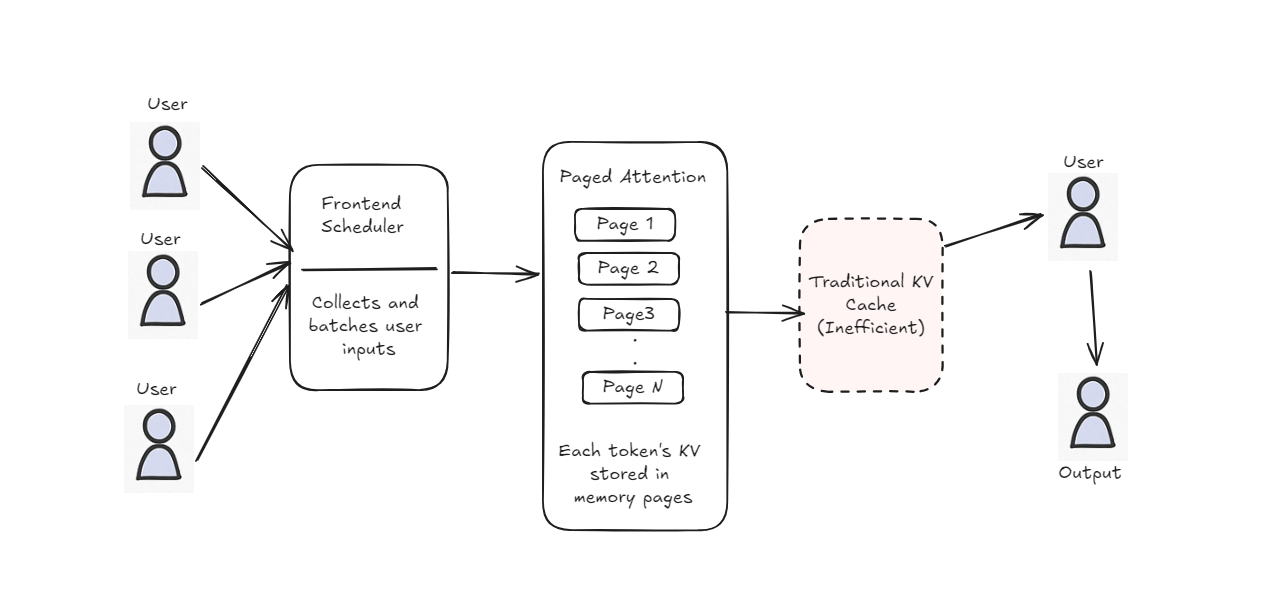
- PagedAttention divides KV-cache memory into smaller blocks, helping reduce memory fragmentation and support more concurrent requests.
- vLLM is most useful for production systems such as chatbots, model APIs, AI assistants, and applications serving multiple users.
- It is primarily a serving engine rather than an LLM itself.
- Important correction: vLLM does not officially stand for “Virtual Large Language Model.” Remove that expansion from the first FAQ.
- The claim that OpenAI, NVIDIA, AWS, Cohere, and other named companies use vLLM should be supported with reliable sources or rewritten more cautiously.
If you’ve ever used AI tools like ChatGPT and wondered how they manage to respond instantly even when thousands of users are interacting at the same time, I’ve had the exact same question.
I ran into this problem firsthand when working with large language models in real-world applications, where performance issues don’t show up in demos but surface quickly in production. That’s when vLLM started to matter.
This article exists because I wanted a clear, practical understanding of what vLLM actually does, why it was built, and where it fits in real systems, not just benchmarks.
Whether you’re trying to speed up a chatbot, reduce GPU costs, or simply understand how modern LLM serving works under the hood, this guide reflects the explanations I wish I had when I started working with inference at scale. Let’s dive in.
What is vLLM?
vLLM is a light-weight, open-source, efficient inference engine designed for large language models (LLMs) such as LLaMA, Mistral, GPT-style models, and is also well-suited for smaller models. It is optimized for high-throughput generation of text with low latency using clever features such as PagedAttention and dynamic batching. In simple terms, vLLM helps you run LLMs faster and more efficiently whether for chatbots, APIs, or real-time applications.
Why Was vLLM Developed?
Transformer models are powerful but can be slow and inefficient when many users try to use them at once. During inference, they often struggle with high memory usage and poor parallel handling. vLLM was developed to fix these issues by making inference faster, lighter on memory, and better at serving multiple users at the same time.
It uses techniques like PagedAttention and dynamic batching to improve speed and scalability. This makes it ideal for real-world apps like chatbots, APIs, and AI assistants.
Traditional Inference vs vLLM: Feature-by-Feature Comparison
| Feature | Traditional Inference | vLLM (Modern Inference) |
Batching | Static (fixed-size, manual) | Dynamic (automatic, real-time) |
Multi-user Support | Usually one request at a time | Supports many concurrent requests |
KV Cache Memory | One large block per user, hard to reuse | PagedAttention: memory-efficient paging |
GPU Utilization | Often underutilized | Optimized for full GPU throughput |
Latency | Higher, especially under load | Low, even with many users |
Throughput | Lower (fewer tokens/sec) | High throughput (more tokens/sec) |
Ease of | Manual setup and coding | OpenAI-compatible API |
Best For | Prototyping or low-traffic tools | Production-scale applications |
vLLM Architecture and Key Innovations
High Throughput
- High throughput means processing a large number of requests or tokens quickly in a short amount of time. In the case of LLMs, it refers to how many words (tokens) the model can generate per second, especially when handling multiple users or queries at once.
- vLLM is designed to maximize throughput so you can serve many users efficiently without slowing down.
vLLM introduces several smart techniques to make large language models faster and more efficient. Here are the key ones
PagedAttention
PagedAttention becomes easier to understand once you look at how attention and KV caching behave under multi-user workloads. I found that breaking it down this way makes its impact on memory efficiency and scalability much clearer.
What Is Attention?
When a model generates text, it references previously generated tokens to decide what comes next. This mechanism, called attention, helps maintain context, but I’ve seen how it becomes increasingly expensive as sequences grow longer.
Example of Attention
Let’s say the model is generating this sentence:
"The quick brown fox jumps over the lazy dog"
- When predicting “quick” → it looks at: [The]
- When predicting “brown” → it looks at: [The, quick]
- When predicting “fox” → it looks at: [The, quick, brown]
- ... and so on.
Problem:
As the sentence gets longer, the model has to look back at more and more words each time, repeating the same work over and over. This makes it slow and inefficient for long text. To solve this, a method called KV cache was introduced.

Walk away with actionable insights on AI adoption.
Limited seats available!

What Is KV Cache?
To avoid repeating the same computations at every decoding step, the model stores intermediate attention results in fast-access memory known as the KV cache. In practice, this significantly improves inference speed, but I noticed traditional KV cache layouts don’t scale well with many concurrent users. Consider this metaphor: You’re doing a puzzle, and you’ve figured out some of it, so you write down on a sticky note the hints you’ve learned.
Example with KV cache
- The model stores the results for “The”, then “quick”, then “brown”…
- When it reaches “fox”, instead of recomputing everything, it just reads cached data:
- “Oh, I already know how ‘The’, ‘quick’, and ‘brown’ affect this.”
- Basically it does calculation once and stores the calculated value, so it won’t do calculation again instead it uses the calculated value for reference.
- So it skips re-reading and saves time.
Benefit: Much faster than normal attention!
Problem: Imagine you’re doing this for 100 users, each writing their own sentence like “The quick brown fox...”. All their KV caches are stored in one big memory block that fills up fast and can’t be reused well.
What Is PagedAttention?
PagedAttention solves these problems by organizing memory-like pages in a notebook instead of one long scroll. Each user’s info is saved in small pages, and the system can:
- Reuse empty pages when users leave
- Add or remove pages on the fly
- Access only the pages it needs, making everything faster and more efficient.
Real-life analogy:Imagine you’re running a library.
- Traditional KV Cache: You put all books from all users on one giant, messy shelf.
- PagedAttention: You give each user their own small shelf, and if they leave, you reuse that shelf space for someone else.
Example with PagedAttention:
- User A is writing: “The quick brown fox...”
- Each word's info is stored on a separate memory page
- Page 1: “The”
- Page 2: “quick”
- Page 3: “brown”
- Page 4: “fox”
- If user A finishes or disconnects, those pages are freed and reused by User B writing: “The fast grey wolf
Benefits:
- No wasted space
- Can serve many users at once
- Perfect for long conversations or chatbots
What Is Dynamic Batching?
Think of a bus sitting there waiting to pick you up. In the traditional systems, the bus doesn’t leave until enough people have gotten on (fixed batching), losing time if there aren’t enough passengers. Dynamic batching is the equivalent of one smart bus that keeps going, it simply picks up customers as they appear, no need to wait for it to fill up.
Dynamic batching allows incoming requests to be grouped and processed continuously instead of waiting for fixed batch sizes. I’ve found this keeps latency predictable even when request patterns are uneven. This makes things fast and efficient, even when there are many users hitting the model at various times.
GPU Utilization Optimizations:
Large models need powerful hardware (GPUs) to run. But traditional methods don’t always use the GPU fully, they leave parts of it idle.
vLLM uses smart scheduling, memory reuse, and optimized code to make full use of the GPU’s power, which leads to higher speed, better performance, and less waste.
Quantization:
vLLM currently supports quantized models, with AWQ being the most stable and integrated format. Support for other methods like GPTQ, INT4, INT8, AutoRound, and FP8 is emerging or experimental depending on model and backend.
VLLM Setup for Text Generation Model:
pip install vllm gradioimport gradio as gr
from vllm import LLM, SamplingParams
# Load model once
llm = LLM(model="TinyLlama/TinyLlama-1.1B-Chat-v1.0")
# Set decoding parameters
sampling_params = SamplingParams(
temperature=0.7,
top_p=0.95,
max_tokens=128,
)
# Build prompt using chat-style format
def build_prompt(history, user_input):
prompt = ""
for user, bot in history:
prompt += f"<|user|>\n{user}<|end|>\n<|assistant|>\n{bot}<|end|>\n"
prompt += f"<|user|>\n{user_input}<|end|>\n<|assistant|>\n"
return prompt
# Inference function
def chat_fn(user_input, history):
prompt = build_prompt(history, user_input)
outputs = llm.generate(prompt, sampling_params)
reply = outputs[0].outputs[0].text.strip()
return reply
# Gradio UI
gr.ChatInterface(
fn=chat_fn,
title="🦙 TinyLlama Chat (Basic vLLM)",
description="Running TinyLlama-1.1B with vLLM — simple Gradio interface.",
chatbot=gr.Chatbot(height=400),
theme="soft",
examples=["Hi", "What's the capital of India?", "Tell me a joke"],
).launch()vLLM is designed to work with a specific type of large language model: decoder-only transformer models.
Model Architecture: Decoder-Only Transformer Models
These models are the most common type used for text generation, like answering questions, writing code, or chatting with users.
What is a Decoder-Only Model?Think of a transformer model as a machine with two main parts:
- An encoder (understands input, like in translation)
- A decoder (generates new text based on input)
Decoder-only models skip the encoder and focus just on generating output from previous text, they're like really smart autocomplete systems.
Example When you type:
“The quick brown fox”
A decoder-only model tries to complete it, predicting something like:
Walk away with actionable insights on AI adoption.
Limited seats available!
“jumps over the lazy dog”
Popular decoder-only models supported by vLLM:
- LLaMA (Meta)
- GPT-2 / GPT-3 / GPT-NeoX
- Falcon
- Mistral
- OPT
- BLOOM
These models work well with vLLM because they generate text one word (token) at a time and benefit from vLLM’s features like PagedAttention and dynamic batching.
OpenAI Compatibility
vLLM is designed to mimic the same API that OpenAI uses. That means you can run models on vLLM just like you would with OpenAI’s GPT API, using the same code (like openai.ChatCompletion.create()).
Why Is This Useful?
- Plug-and-Play for Developers:If you already built apps using OpenAI’s API, you can switch to vLLM with almost no code changes.
- Avoid API Costs:Instead of paying per request to OpenAI, you can run your own model locally or on your own server using vLLM.
- More Control:You can host your own model, choose which one to use (like LLaMA or Mistral), and have full control over data, privacy, and updates.
- Scale for Production:vLLM can handle many users at once, making it a great alternative for high-traffic applications.
Need a visual chat surface? Check UI for LLM with Gradio.
vLLM OpenAI-Compatible API Setup (With Example Code)
vLLM makes it easy to use your own large language models as a drop-in replacement for OpenAI’s API. Here’s how you can set it up and test it.
Step 1: Start the vLLM Server
Use the vllm serve command to launch your model. This example runs Llama 3.2B Instruct with an API key:
vllm serve meta-llama/Llama-3.2-3B-Instruct --dtype auto --api-key token-abc123- --dtype auto: Automatically selects the best precision (like float16) for performance.
- --api-key: Adds a simple layer of authentication for your API.
By default, the server runs at: http://localhost:8000/v1
Step 2: Use the OpenAI SDK with vLLM
vLLM follows the OpenAI API format, so you can use the official OpenAI Python client with almost no changes:
from openai import OpenAI
client = OpenAI(
    base_url="http://localhost:8000/v1",  # Make sure it's http, not https
    api_key="token-abc123",               # Same key as used in vllm serve
)
completion = client.chat.completions.create(
    model="meta-llama/Llama-3.2-3B-Instruct",
    messages=[{"role": "user", "content": "Hello!"}]
)
print(completion.choices[0].message)
Conclusion
vLLM addresses the practical challenges of serving large language models at scale. Based on the evaluation of inference systems in production, it provides more predictable performance through better memory management, batching, and GPU utilization.
With features like PagedAttention, dynamic batching, and OpenAI-compatible APIs, it solves common problems like high latency and underused hardware.
Whether you're building a chatbot, an AI-powered tool, or a large-scale application, vLLM helps you streamline performance, cut costs, and scale with ease. If you're looking for more control, better speed, and production-ready performance from your LLM deployments, vLLM is well worth exploring, and if you’re comparing different communication methods for model servers, you can also look at STDIO transport in MCP to see how other protocols handle transport and integration.
Frequently Asked Questions?
1. What does the vLLM stand for?
vLLM stands for Virtual Large Language Model. It's built to run language models faster and use memory more efficiently, making responses quicker and smoother.
2. How does vLLM work?
vLLM works by using memory efficiently and handling multiple requests together, making AI responses faster and smoother.
3. What is the difference between vLLM and LLM?
LLM refers to the AI model itself, while vLLM is a system that runs LLMs faster and more efficiently using smart memory and batching.
4. What are the benefits of vLLM?
vLLM gives faster response, uses less memory, supports more users at once and runs large AI models more smoothly and efficiently.
5. What companies use vLLM?
Companies like NVIDIA, OpenAI, AWS, Cohere, Hugging Face, and many startups use vLLM to serve AI models faster and at scale.
6. Why is vLLM so fast?
vLLM is fast because it loads only needed data, reuses memory smartly and handles many users' requests at the same time without delays.

Walk away with actionable insights on AI adoption.
Limited seats available!



