In modern eCommerce architecture, speed, payload efficiency, and frontend flexibility directly influence conversion rates, retention, and infrastructure cost.
I’m writing this for developers and technical decision-makers evaluating whether Shopify’s Storefront GraphQL API is simply another API option or a foundational shift in how storefront data should be queried and structured.
Shopify’s Storefront GraphQL API introduces a more precise, schema-driven way to request and manipulate storefront data, particularly valuable in headless and custom storefront builds where performance and data control matter. Shopify has built the Storefront GraphQL API to support modern storefront development, where the frontend often needs precise data without extra network calls or heavy payloads.
What differentiates GraphQL structurally from traditional REST approaches used in many storefront builds?
REST APIs rely on fixed endpoints and predefined response shapes, which limits data precision at scale, which can force you to either fetch extra fields you do not need or make multiple calls to collect everything required for a page.
With Storefront GraphQL, the client can request exactly the fields it needs, which improves performance and keeps responses focused and predictable.
The objective of this guide is practical: clarify GraphQL fundamentals and apply them to real Shopify storefront patterns make GraphQL easier to understand and give you a practical path to use Shopify’s Storefront API with confidence.
We will start with core GraphQL ideas and then move into real storefront patterns like pagination, filtering, cart mutations, fragments, error handling, and performance tuning.
Let’s begin by setting up Storefront GraphQL and learning how to explore it safely before you use it in production.
Setting Up and Getting Started with Storefront GraphQL
Implementing Storefront GraphQL is a strategic step when building scalable, performance-focused storefronts. To get started, you need access credentials, correct permissions, and a place to test queries before wiring them into your codebase.
Prerequisites for using Storefront GraphQL
Before you work with Storefront GraphQL, you should understand the basic GraphQL structure: fields, nested objects, and how queries are formatted. You do not need to master everything at once, but you should be comfortable reading and editing a query.
It is also helpful to know JavaScript, because many storefront builds use JavaScript frameworks to call the API and manage responses inside UI components.
Finally, you must have a Shopify account with an active store. That store provides the real product, collection, pricing, and checkout data that your Storefront API calls will return.
Obtaining API Credentials
To access the Storefront GraphQL API, you need to obtain API credentials. These credentials will authenticate your requests and allow you to interact with your store's data securely. Here's a simplified breakdown of the process:
Access your Shopify admin panel using your credentials.
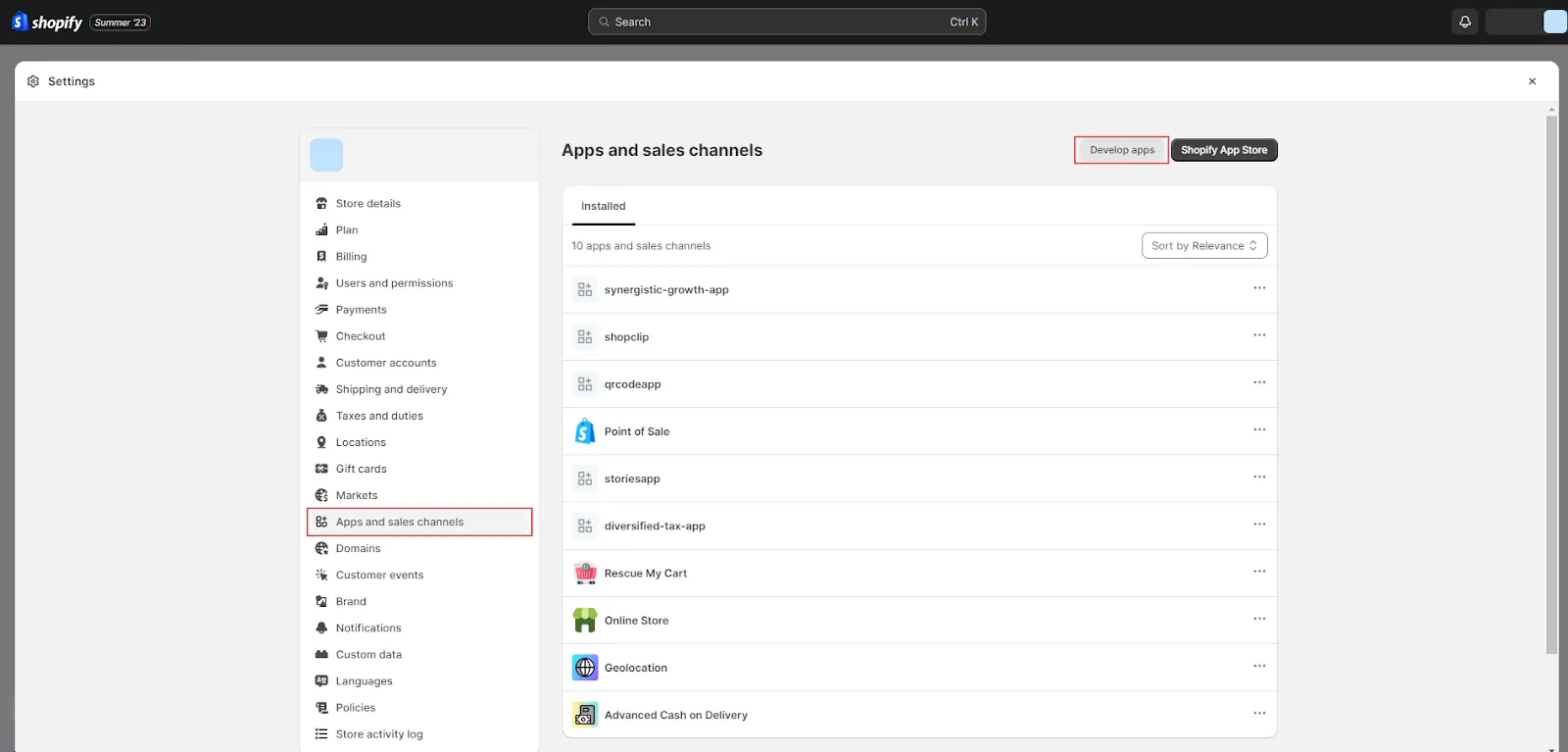
From your admin panel, head to "Settings," then select "Apps & Sales Channels," and finally, click on "Develop Apps.
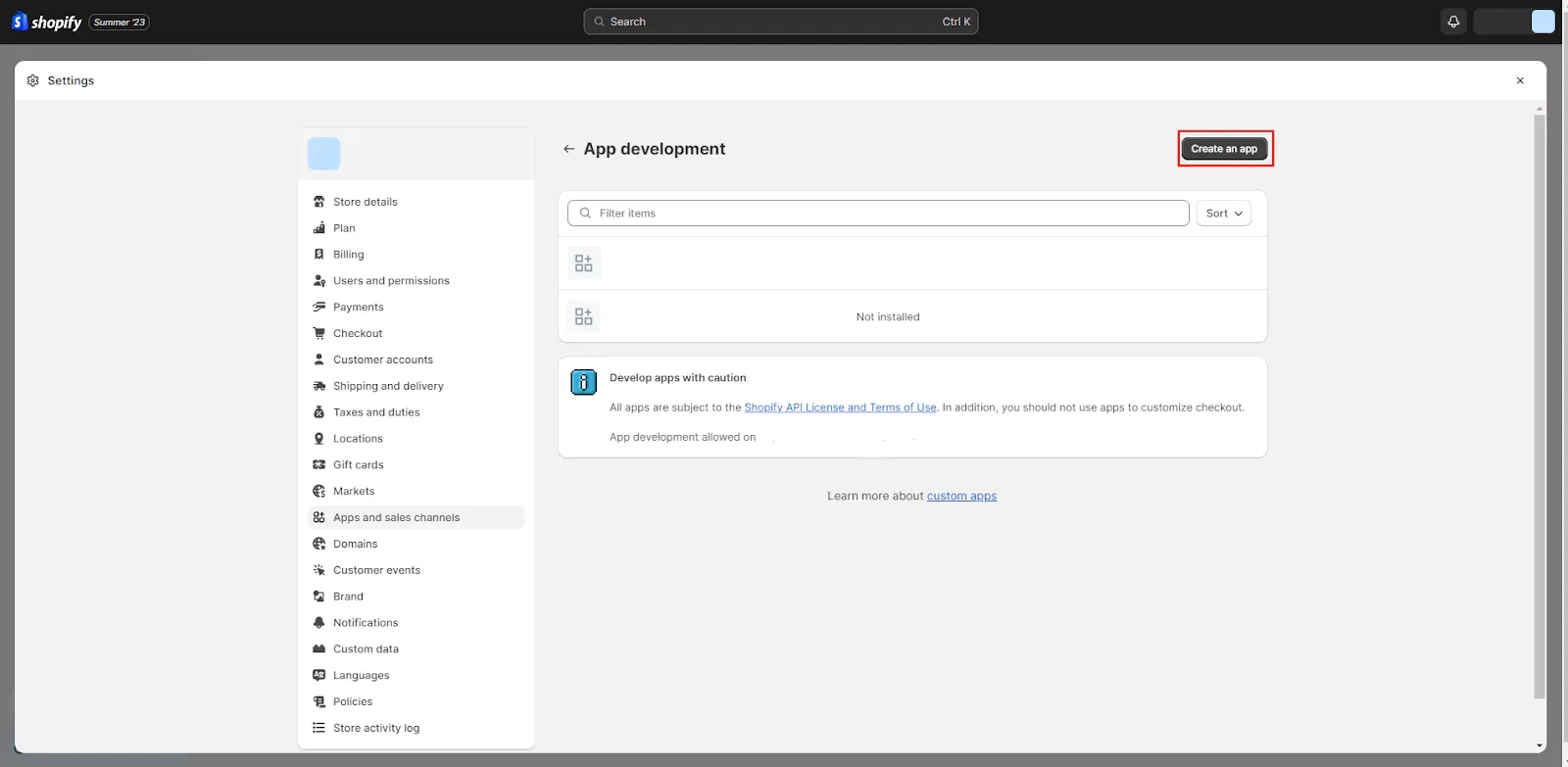
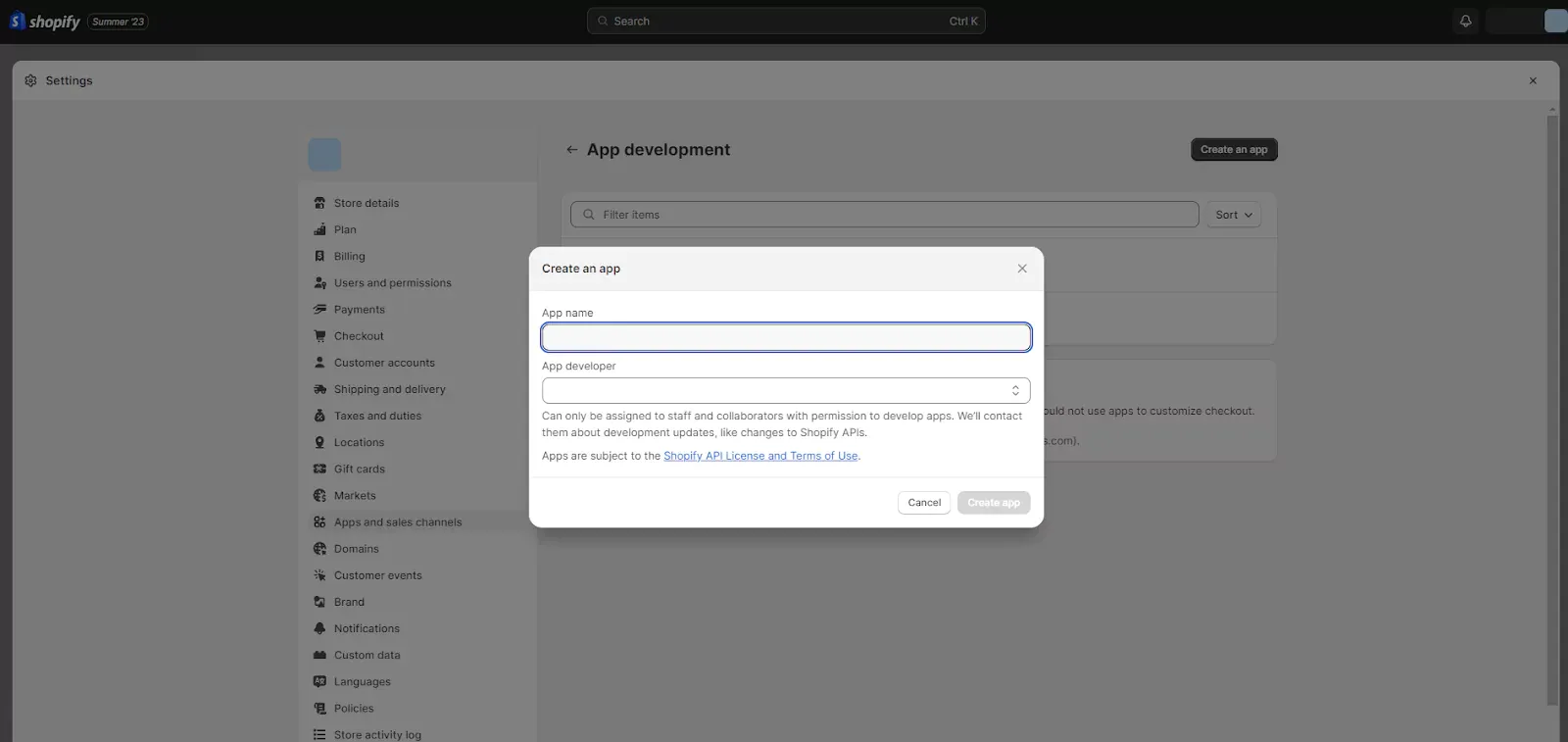
Click on “Create an App”
Give a name to your app on the popup that will appear as shown below,
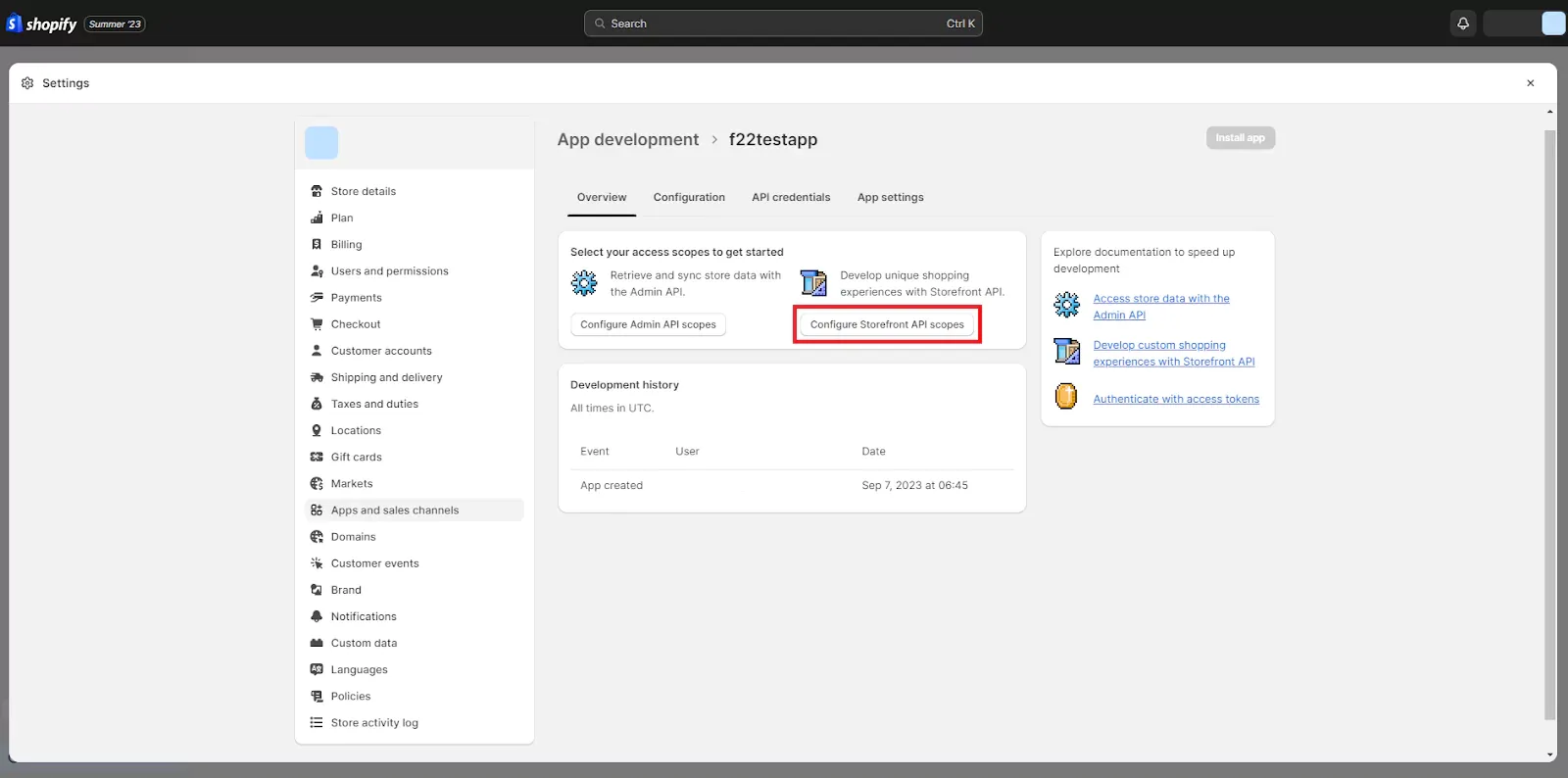
Now select “Configure Storefront API Scopes” here as shown in the screenshot below,
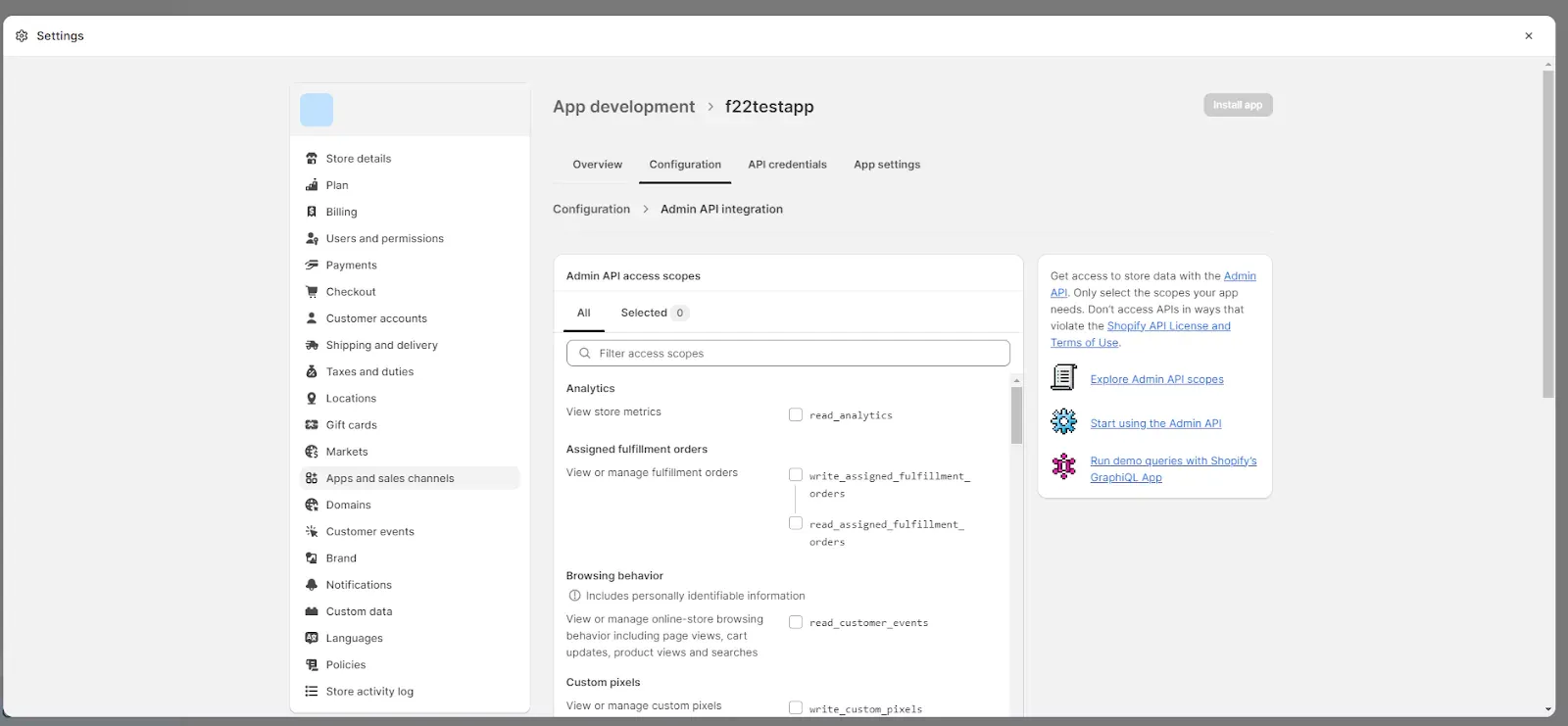
Now select all the scopes that you will need from the “Admin API Access Scopes” section.
Once you’ve selected all the essential scopes that you want, save the process and install the app.
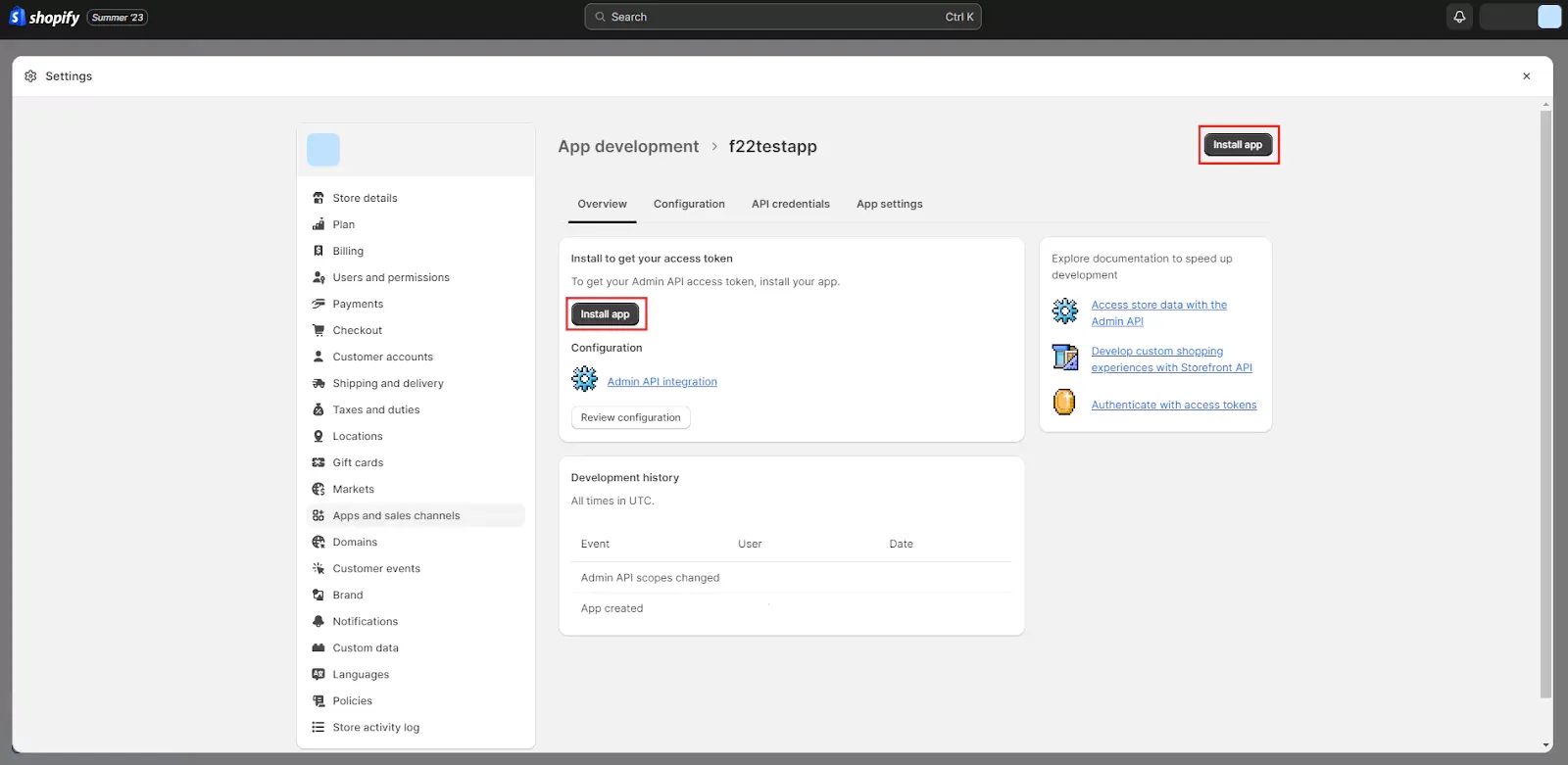
Now, go to the “API Credentials” section to get the API key.
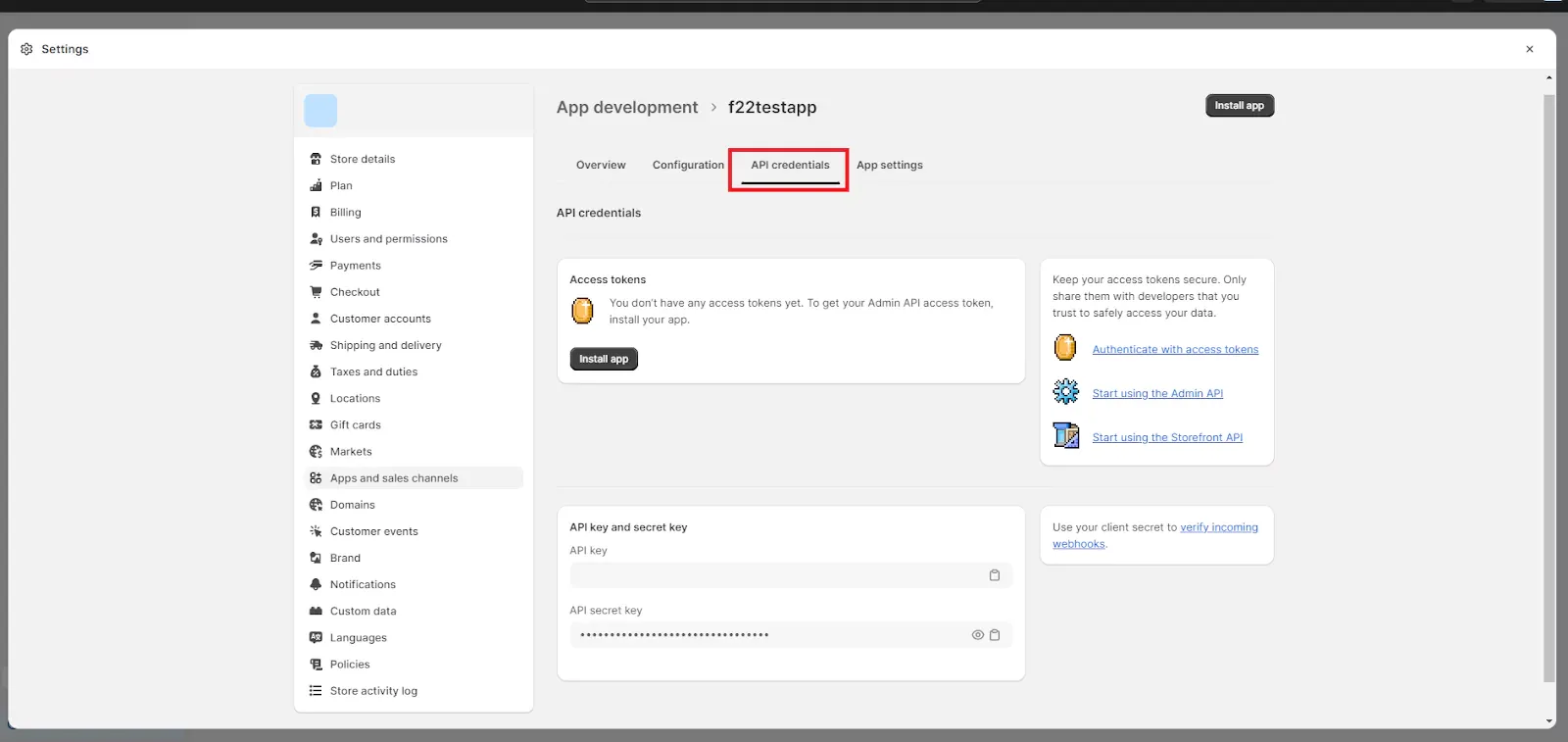
- There, you can generate your API key. Make sure you choose the appropriate permissions for the key based on the actions you intend to perform via the API.
- Once generated, your API key and any other necessary credentials should be stored securely. This might involve using environment variables or other secure storage methods.
Exploring the GraphQL Playground
Once credentials are ready, your next step is testing calls in GraphQL Playground, which is designed for exploring schemas and validating queries safely.
To access the GraphQL Playground, navigate to https://your-shopify-store.myshopify.com/api/2022-10/graphql.json in your browser. Replace your-shopify-store with your actual store's URL.
On the right-hand side of the Playground, locate the "HTTP HEADERS" section. Here, you'll need to include your API key as follows:
{
  "X-Shopify-Storefront-Access-Token": "your-api-key"
}
Let's start with a simple query to retrieve basic product information.
query {
  products(first: 5) {
    edges {
      node {
        id
        title
        priceRange {
          minVariantPrice {
            amount
            currencyCode
          }
        }
      }
    }
  }
}
This query fetches the IDs, titles, and minimum variant prices for the first five products in your store.
Click “Play” to execute it, and check the response panel on the right. If the response matches what you requested, you know your token, scopes, and endpoint are correctly configured.
Understanding GraphQL

Before you go further, it helps to understand why GraphQL often feels cleaner than REST for storefront work. If you want a deeper comparison, a GraphQL vs REST guide can help you connect the concepts.
REST uses a fixed endpoint structure, where each endpoint returns a pre-defined response shape. That can work, but it also locks you into whatever the endpoint gives you.
This creates two common problems: over-fetching, where you download extra fields you never use, and under-fetching, where you must call several endpoints to build a single view.
GraphQL addresses these inefficiencies by allowing clients to request only the fields required per component, which reduces wasted data and helps the network stay efficient, especially on mobile connections.
Key Concepts of GraphQL
GraphQL is based on three core operations: queries, mutations, and subscriptions. Once you understand these, the rest of the API becomes much easier to reason about.
Queries: Unveiling Data Precision
Queries represent the read layer of GraphQL and define the exact data shape required by the client. You specify exactly which fields you want, and the response matches the shape of your request.
Because GraphQL supports nested fields, you can often fetch related data in one request, instead of calling multiple endpoints like you might in REST.
Example:
query {
  product(id: "product-123") {
    name
    price
    description
  }
}
This query retrieves only the name, price, and description for a single product, which keeps the response focused and lightweight.
Mutations: Enabling Data Manipulation
Mutations handle state changes within the Storefront API, such as checkout creation or cart updates. In a storefront, this usually means user-driven actions like creating checkouts, adding cart items, or updating quantities.
A useful part of GraphQL mutations is that they can return updated data immediately, so your UI can refresh without extra calls.
Example:
mutation {
  addToCart(productId: "product-456", quantity: 2) {
    success
    message
    cartTotal
  }
}
This mutation adds the product, then returns the result along with the new cart total.
Subscriptions: Real-time Data Delight
Subscriptions support real-time updates, where the server pushes data updates when events happen, instead of the client repeatedly requesting updates.
This can be valuable for storefront experiences like product drops, limited inventory alerts, or live content updates.
Example:
subscription {
  newProductAdded {
    id
    name
    price
  }
}
When a new product is added, subscribed clients receive the update automatically.
Your Store, Open for Business - Fast
Custom Shopify builds that convert browsers into buyers.
GraphQL Schema and Types
A GraphQL schema defines what data exists, what types are available, and how different objects relate to each other. You can think of it as the API’s “map,” because it tells you what you can query and how to structure requests.
Schemas define types like Product, Collection, or Checkout, and each type contains fields that you can request. This structure keeps the API predictable and helps prevent errors.
For example, a Product type might include title, price, and description, which makes it clear what data is available and how it should be queried.
Constructing Basic Queries
Once you understand the schema, you can begin writing queries that match real storefront needs. This section covers basic queries, product queries, and collection queries that are commonly used in production storefronts.
Writing Your First GraphQL Query
GraphQL queries are designed to be readable and expandable, which is one reason developers prefer them for storefront work.
Here's a simple example:
query {
  shop {
    name
    description
  }
}
This requests only the shop name and description, and the response returns those exact fields.
Retrieving Product Information
Product data is central to any storefront, so being able to pull it efficiently matters for performance and UX.
Here is a query that pulls a product plus a few variants:
query {
  product(id: "your-product-id") {
    title
    description
    variants(first: 3) {
      edges {
        node {
          title
          price
        }
      }
    }
  }
}
This retrieves the product title and description, plus variant titles and prices, which is useful for product detail pages.
Fetching Collections and Categories
Collections help organize products and improve browsing. With GraphQL, you can fetch collections and products inside them in one structured query.
Here's an example query to fetch information about collections:
query {
  collections(first: 5) {
    edges {
      node {
        title
        description
        products(first: 3) {
          edges {
            node {
              title
              priceRange {
                minVariantPrice {
                  amount
                  currencyCode
                }
              }
            }
          }
        }
      }
    }
  }
}
This returns the first five collections and a preview of products in each collection, which is useful for category pages.
Advanced Querying
As storefront complexity grows, you need patterns for dynamic variables, pagination, and more precise filtering. These features keep your API usage efficient and your pages responsive.
Using Query Variables for Dynamic Data
Hardcoding IDs is not practical in real apps. Query variables let you pass values at runtime, which makes queries reusable across pages and user actions.
Example:
query GetProductDetails($productId: ID!) {
  product(id: $productId) {
    title
    price
  }
}
Now the same query can fetch any product depending on the variable passed in.
Implementing Pagination for Large Result Sets
Stores can have hundreds or thousands of products, so loading everything at once is slow and unnecessary. Pagination helps you fetch results in manageable chunks.
Example:
query GetProducts($first: Int!, $after: String) {
  products(first: $first, after: $after) {
    edges {
      node {
        title
        price
      }
    }
    pageInfo {
      hasNextPage
      endCursor
    }
  }
}
This query supports cursor-based pagination using endCursor, and hasNextPage tells you if there are more results to fetch.
Filtering and Sorting Results
Filtering and sorting are essential for search pages and product listing pages, especially when users expect filters like price, type, and relevance.
Example:
query GetFilteredProducts($minPrice: Money!, $sortBy: ProductSortKeys!) {
  products(first: 5, sortKey: $sortBy, query: "min_price:$minPrice") {
    edges {
      node {
        title
        price
      }
    }
  }
}
This filters by minimum price and sorts using a selected sort key, which supports more controlled browsing experiences.
Working with Mutations
Queries read data, but mutations power real shopping actions like adding items to a cart and updating quantities. These are the operations that make a storefront interactive.
Introduction to Mutations in GraphQL
Mutations are the write-side of GraphQL. They allow the client to trigger changes on the server, such as creating a checkout or updating line items.
GraphQL mutations follow the schema, so they stay consistent and predictable. That matters because checkout and cart operations need stability, not guesswork.
Adding Products to the Cart
Adding items to a cart must feel instant and reliable. Storefront GraphQL supports this through checkout mutations.
Example:
mutation AddToCart($productId: ID!, $quantity: Int!) {
  checkoutCreate(input: {
    lineItems: [{ variantId: $productId, quantity: $quantity }]
  }) {
    checkout {
      id
      webUrl
    }
    checkoutUserErrors {
      code
      field
      message
    }
  }
}
If the mutation succeeds, you receive the checkout ID and URL. If it fails, you also get structured errors, which helps you fix issues quickly.
Updating Cart Contents
Users frequently change quantity or remove items, so your storefront must handle updates cleanly.
Example:
mutation UpdateCartItem($checkoutId: ID!, $lineItemId: ID!, $quantity: Int!) {
  checkoutLineItemsUpdate(checkoutId: $checkoutId, lineItems: [{ id: $lineItemId, quantity: $quantity }]) {
    checkout {
      id
      webUrl
    }
    checkoutUserErrors {
      code
      field
      message
    }
  }
}
This mutation updates the cart item quantity and returns the updated checkout information.
Data Customization & Fragments
As queries grow, repetition becomes a real problem. Fragments solve this by letting you reuse field groups across queries, which improves consistency and maintainability.
Creating Reusable Fragments for Queries
Fragments allow you to define a reusable “field bundle” once, then include it wherever needed.
Example:
fragment ProductDetails on Product {
  title
  price
  description
}

query GetProduct($productId: ID!) {
  product(id: $productId) {
    ...ProductDetails
    variants(first: 3) {
      edges {
        node {
          ...ProductDetails
        }
      }
    }
  }
}
This avoids repeating the same fields, which makes edits easier later.
Customizing the Data Returned Using Fragments
Fragments can also help you return minimal data when you do not need a full object.
Example:
fragment MinimalProduct on Product {
  title
  price
}

query GetProducts($first: Int!) {
  products(first: $first) {
    edges {
      node {
        ...MinimalProduct
      }
    }
  }
}
This is useful for product grids, where you only need basic details.
Best Practices for Data Optimization
GraphQL provides granular control, but performance depends on disciplined query design.
Avoid Over-fetching: Request only fields you use on the page. Mindful Nesting: Keep nesting reasonable to prevent slow responses. De-duplicate Fields: Use fragments so fields are not repeated. Caching Strategies: Cache stable responses to reduce network calls.
Error Handling and Validation
Even well-built storefronts face errors, so handling failures cleanly is part of professional development. GraphQL supports structured errors, which makes debugging and user messaging easier.
Handling Errors in GraphQL
GraphQL includes errors inside the response, typically in an errors array.
Example:
{
  "errors": [
    {
      "message": "Product not found",
      "code": "PRODUCT_NOT_FOUND"
    }
  ]
}
This helps clients decide what to do next, such as showing a fallback message or removing a broken product link.
Validating Input Data
Validation prevents bad inputs from breaking your store logic. GraphQL schemas define types and required fields so the server can reject invalid requests.
Your Store, Open for Business - Fast Custom Shopify builds and headless Shopify customization that convert browsers into buyers. Let's Connect
Example:
type Product {
  id: ID!
  title: String!
  price: Money!
}

input CreateProductInput {
  title: String!
  price: Money!
}

type Mutation {
  createProduct(input: CreateProductInput!): Product
}
This structure forces title and price to exist, which prevents incomplete data from getting through.
Error Handling Best Practices
To keep your GraphQL usage stable, treat errors as part of normal flow:
Standardize errors with codes and clear messages. Classify errors so debugging is faster. Provide useful details for developers, not vague errors. Validate inputs server-side, not only on the client. Fail gracefully so the UI still works. Use defaults for optional fields where it makes sense. Apply rate limiting to reduce abuse. Monitor and log errors to spot recurring issues. Write error messages that suggest a next step. Test error cases as seriously as success cases.
Real-time Updates with Subscriptions
Real-time updates can improve engagement, especially for product launches, flash sales, and limited inventory situations. Subscriptions allow clients to receive updates immediately when events occur.
Subscriptions work differently than queries and mutations: queries fetch once, mutations write data, and subscriptions keep a connection open to receive events.
Introduction to Subscriptions in GraphQL
Subscriptions let a client “listen” for events and receive updates when the server data changes.
Your Store, Open for Business - Fast
Custom Shopify builds that convert browsers into buyers.
This is useful in eCommerce because users expect freshness, especially when stock or product availability changes quickly.
Subscriptions often use WebSockets, which keep a live connection open so updates can be pushed instantly.
Setting Up Real-time Product Notifications
A common use case is notifying users when new products are added.
Example:
subscription NewProductAdded {
  newProductAdded {
    id
    title
    price
  }
}
When the event happens, the server sends the new product data right away, and your UI can update without refresh.
Handling Subscription Events
Handling subscription events well means managing the connection, processing incoming events efficiently, and updating the UI in a clean way.
In real storefront builds, you might show a toast notification, update a product list, or trigger a refresh of only one part of the screen.
Performance Optimization
Storefront performance directly impacts user trust, bounce rate, and conversion velocity. If pages load slowly, users leave, especially on mobile. GraphQL can help performance, but only when requests are designed carefully.
Caching Strategies for GraphQL
Caching reduces repeated calls by storing frequently used results.
Shopify Storefront GraphQL can be paired with different caching strategies:
Client-side caching: Use a GraphQL client that stores results. Server-side caching: Cache responses at the server or edge. Persistent caching: Save stable data in a storage layer.
When caching is applied thoughtfully, your storefront feels faster and your server workload drops.
Minimizing Over-fetching and Under-fetching of Data
Over-fetching wastes bandwidth. Under-fetching forces extra calls. GraphQL reduces both, but you still need to request fields with intention.
Example:
query GetProduct($productId: ID!) {
  product(id: $productId) {
    title
    price
  }
}
This query stays lean, which helps pages load quickly and reduces data processing on the client.
Profiling and Monitoring Query Performance
Profiling measures how long queries take and helps you find bottlenecks.
Monitoring tracks performance over time so you can catch slowdowns early.
Tools like Apollo Client Devtools and Chrome DevTools help you inspect payload sizes, timing, and network cost, which makes optimization more realistic and measurable.
Practical Examples and Use Cases
GraphQL becomes easier when you connect it to real storefront features. These examples show how Storefront GraphQL supports search, cart behavior, and personalization.
Building a Product Search Feature
Search improves discovery and reduces friction, especially in large catalogs.
Example:
query SearchProducts($query: String!) {
  products(query: $query, first: 5) {
    edges {
      node {
        title
        price
      }
    }
  }
}
By injecting user input into $query, you can build search that feels responsive and relevant.
Creating a Dynamic Shopping Cart
A good cart experience updates quickly and stays consistent across sessions.
Example:
mutation AddToCart($productId: ID!, $quantity: Int!) {
  checkoutCreate(input: {
    lineItems: [{ variantId: $productId, quantity: $quantity }]
  }) {
    checkout {
      id
      webUrl
    }
  }
}
Implementing a Product Recommendation System
Recommendations can increase average order value by suggesting relevant items.
Example:
query GetRecommendedProducts($customerId: ID!) {
  customer(id: $customerId) {
    recommendedProducts(first: 3) {
      edges {
        node {
          title
          price
        }
      }
    }
  }
}
By using $customerId, you can return recommendations that feel more personalized rather than random.
Conclusion
Shopify’s Storefront GraphQL API represents a shift from endpoint-driven thinking to schema-driven storefront architecture.
By requesting precise fields per component, managing mutations predictably, and applying performance discipline, teams can build storefronts that are faster, leaner, and easier to evolve.
When implemented thoughtfully in headless Shopify builds, Storefront GraphQL becomes not just an API choice, but a structural advantage in storefront performance and maintainability, especially when you need performance, flexibility, and clean data handling.
Storefront GraphQL is not just a different API style; it changes how you design your storefront because you can request exactly what each component needs without pulling extra data.
When you adopt Storefront GraphQL for headless Shopify development, you gain several practical advantages:
Efficiency: You fetch only the required fields, which reduces payload size and network waste. Flexibility: The schema makes it easier to evolve your application as requirements change. Real-time capability: Subscriptions enable live storefront experiences when needed. Customization: Fragments and precise queries let you tailor responses by page type. Maintainability: Reusable fragments reduce duplication and simplify future updates.
If you want to move faster and avoid common mistakes, working with experienced headless developers can help you design scalable query patterns, secure credential handling, and production-ready performance.
Our Headless eCommerce Development team can guide you through Storefront GraphQL based on your business needs, and we also offer a 1-hour free consultation to help you plan your next implementation step.
Frequently Asked Questions
1. What is Shopify Storefront GraphQL API used for?
It allows developers to query and manipulate storefront data with precise field selection, ideal for headless and custom storefront builds.
2. How is Storefront GraphQL different from Shopify REST API?
GraphQL enables clients to request only required fields, reducing over-fetching and improving storefront performance.
3. Is Storefront GraphQL suitable for headless Shopify?
Yes. It is particularly powerful for headless architectures where frontend frameworks control data flow.
4. Can Storefront GraphQL handle real-time updates?
Yes. Subscriptions enable real-time updates for events such as product launches or inventory changes.
5. Does GraphQL improve storefront speed?
When queries are optimized, GraphQL reduces payload size and network overhead, improving performance.
6. What are common mistakes when using Storefront GraphQL?
Over-nesting queries, ignoring pagination, and failing to cache stable responses can degrade performance.
Reference & Resources

Murtuza Kutub
A product development and growth expert, helping founders and startups build and grow their products at lightning speed with a track record of success. Apart from work, I love to Network & Travel.