Voice AI agents are becoming increasingly common in applications such as customer support automation, AI call centers, and real-time conversational assistants. Modern voice systems can process speech in real time, understand conversational context, handle interruptions, and respond with natural-sounding speech while maintaining low latency.
I wanted to understand what it actually takes to build a production-ready voice AI agent using modern tools.
In this guide, I explain how to build a voice AI agent using LiveKit Agents, an open-source framework designed for real-time voice applications. The goal is not just to build a prototype, but to understand the architecture, core components, and practical considerations required to run voice agents reliably at scale.
What Are Voice AI Agents?
Voice AI agents are software systems that can understand spoken language, process the request using artificial intelligence, and respond with synthesized speech in real time.
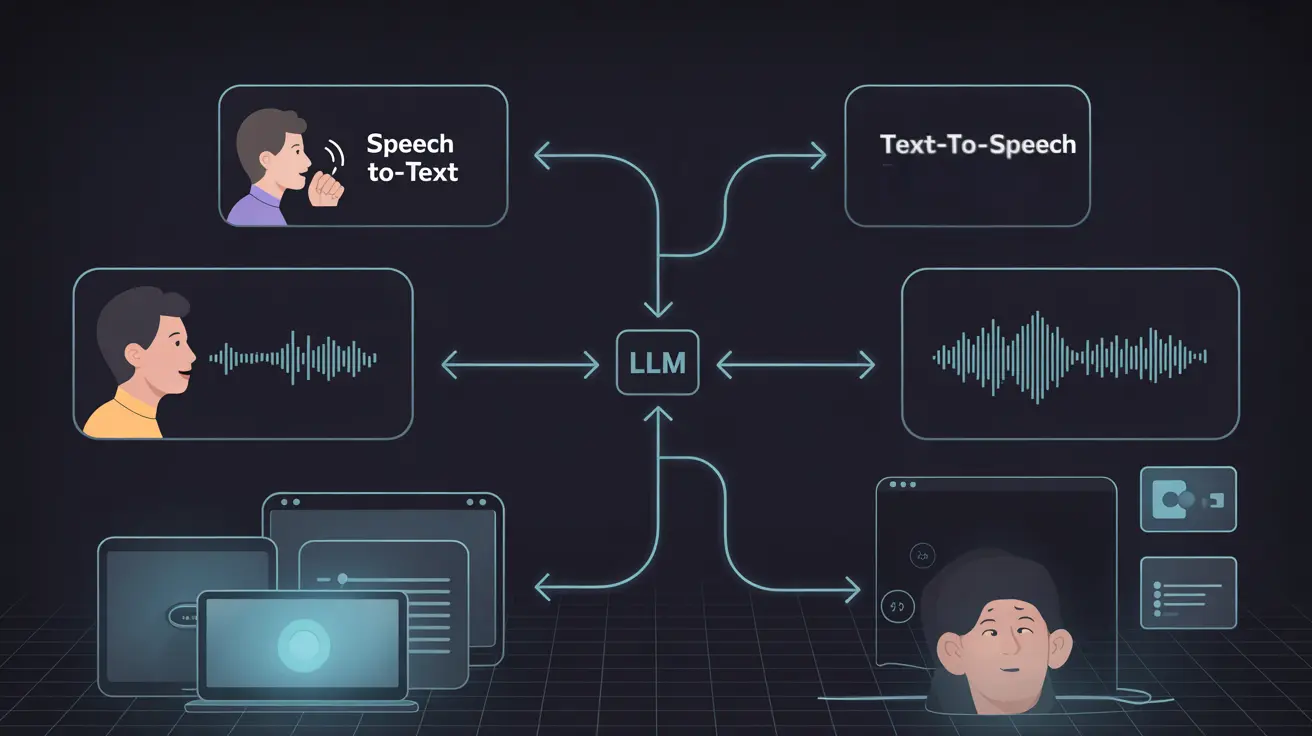
They combine technologies such as speech recognition (STT), large language models (LLMs), and text-to-speech (TTS) to enable natural, conversational interactions between humans and machines.
Voice AI agents are commonly used in applications like AI assistants, customer support automation, voice-enabled applications, and AI call centers, where users interact through speech instead of traditional text or graphical interfaces.
What It Takes to Build a Voice AI Agent
A production-ready voice AI agent must listen to spoken input, detect when a user is speaking, convert speech to text, process the request using a large language model (LLM), and generate a natural speech response. All of this must happen in real time, typically targeting under 500ms latency, while also handling interruptions during conversation.
Frameworks such as LiveKit Agents treat the voice agent as a WebRTC participant, enabling real-time bidirectional audio streaming and support for multimodal interactions.
A typical voice AI system includes:
- Real-time infrastructure: WebRTC streaming with optional SIP for telephony
- AI pipeline: STT → VAD/turn detection → LLM → TTS
- State management: Conversation history, RAG, and tool integrations
- Scalability: Handling concurrent users and optimizing inference costs
- Testing: Evaluating performance with noise, accents, interruptions, and network variability
A basic prototype can often be built in 1–2 hours, while production deployments usually require additional time for testing, scaling, and infrastructure setup.
Prerequisites and Technical Requirements
Before building a voice AI agent, make sure the following tools and resources are available.
Programming languagesPython 3.9+ (recommended) or Node.js 18+
HardwareA standard laptop is enough for development. A GPU is helpful for local models or high-concurrency testing.
Accounts and API keys
- LiveKit Cloud (required for real-time infrastructure)
- STT providers: AssemblyAI or Deepgram
- LLM providers: OpenAI, Groq, Anthropic, or xAI Grok
- TTS providers: Cartesia, ElevenLabs, or Rime
Development tools
- uv (Python package manager) or npm
- Git
- LiveKit CLI for authentication and deployment
- Docker or Kubernetes for self-hosted production setups
Browser support
A modern browser such as Chrome or Firefox is recommended for testing WebRTC-based voice interactions.
A basic setup usually takes 15–30 minutes. For quick experimentation, LiveKit also provides Agent Builder, a browser-based tool that allows you to prototype voice agents without writing code.
Two Main Approaches to Building a Voice AI Agent
There are two common architectures used to build voice AI agents.
1. Cascaded (Pipeline) Architecture
Audio → VAD/STT → LLM → TTS → Audio
This is the most common approach for production systems. Each component in the pipeline can be customized depending on the use case.
For example:
- STT: AssemblyAI or Deepgram
- LLM: OpenAI, Groq-hosted Llama, or Claude
- TTS: Cartesia, ElevenLabs, or Rime
Frameworks such as LiveKit Agents manage this pipeline through AgentSession, handling streaming audio, interruptions, and conversation state. This approach works well for applications that require RAG, tool calling, or complex workflows.
2. Realtime / Speech-to-Speech Models
In this approach, a single multimodal model processes audio input and generates audio output directly.
Examples include:
- OpenAI Realtime API
- Google Gemini Live
- xAI Grok Voice Agent API

Walk away with actionable insights on AI adoption.
Limited seats available!

These models preserve speech characteristics such as prosody, emotion, and accents, and can achieve very low latency (often under 200ms). However, they provide less control over individual components compared to pipeline architectures.
Recommendation
For most production systems, the cascaded pipeline architecture provides greater control, scalability, and flexibility.
Realtime speech-to-speech models are useful for low-latency conversational demos or rapid prototyping, and they can also be integrated into hybrid pipelines when needed.
Core Components You Need to Configure
A voice AI agent typically relies on several core components that work together in a real-time pipeline.
Speech-to-Text (STT) – Converts user speech into text.Examples: AssemblyAI Universal Streaming, Deepgram Nova-2.
Voice Activity Detection (VAD) – Detects when a user starts and stops speaking.Common choice: Silero VAD.
Turn Detection – Determines when the user has finished speaking so the agent can respond.LiveKit’s MultilingualModel improves speech completion detection across languages.
Large Language Model (LLM) – Interprets the request, generates responses, and handles reasoning, tool calls, or RAG.Examples: GPT-4.1-mini, Groq-hosted Llama 3.1, Claude, xAI Grok.
Text-to-Speech (TTS) – Converts the generated response into natural audio output.Examples: Cartesia Sonic-3, ElevenLabs Turbo v2, Rime.
Noise Cancellation – Cleans background noise for clearer voice input.Options: BVC (general use) and BVCTelephony (for phone calls).
Observability & Monitoring – Tracks transcripts, latency, and performance during conversations.
Open-Source vs Platform-Based Development
Developers typically build voice AI agents using either open-source frameworks or managed platforms. The right approach depends on the level of control, customization, and infrastructure management required.
| Aspect | Open-Source Frameworks | Platform-Based Tools |
Control | Full control over the voice pipeline and infrastructure | Limited customization |
Flexibility | High — supports RAG, tools, and custom workflows | Restricted to platform features |
Setup Speed | Requires development setup | Faster to deploy |
Infrastructure | Must be managed manually | Fully managed |
Cost | Usually lower long-term | Often higher due to platform pricing |
Examples | LiveKit Agents, Pipecat | Vapi, Retell, Bland |
Recommendation
For developers building custom or production voice AI systems, open-source frameworks like LiveKit Agents offer greater flexibility and control.
Managed platforms can be useful for rapid prototyping, but they may introduce higher costs and vendor lock-in as systems scale.
Step-by-Step Guide to Building Your Voice AI Agent
Install LiveKit CLI & Authenticate:
brew install livekit-cli  # Or curl/winget
lk cloud auth             # Links to your project
Initialize Project:
For Python:
uv init livekit-voice-agent --bare
cd livekit-voice-agent
For Node.js:
npm init -y
npm install @livekit/agents
Install Dependencies:
Python:
uv add "livekit-agents[silero,turn-detector]~=1.0" "livekit-plugins-noise-cancellation~=0.2" python-dotenv
Node.js:
npm install @livekit/agents @livekit/components-core dotenvSet Up Environment:
lk app env -w  # Generates .env.local with LIVEKIT keys
# Add OPENAI_API_KEY=sk-..., etc.
Create Basic Agent (agent.py - Python Example):
from dotenv import load_dotenv
from livekit import agents, rtc
from livekit.agents import AgentServer, AgentSession, Agent, RoomInputOptions
from livekit.plugins import noise_cancellation, silero
from livekit.plugins.turn_detector.multilingual import MultilingualModel
from livekit.plugins import openai

load_dotenv(".env.local")

class Assistant(Agent):
    def __init__(self):
        super().__init__(
            instructions="""
You are a helpful voice AI assistant. Respond concisely, use natural spoken language.
Handle interruptions gracefully. If using tools, explain actions verbally."""
        )

async def entrypoint(ctx: agents.JobContext):
    await ctx.connect()

    session = AgentSession(
        stt="assemblyai/universal-streaming:en",  # Or deepgram/nova-2
        llm="openai/gpt-4.1-mini",               # Or groq/llama3-70b
        tts="cartesia/sonic-3:9626c31c-bec5-4cca-baa8-f8ba9e84c8bc",  # Or elevenlabs/turbo-v2
        vad=silero.VAD.load(),
        turn_detection=MultilingualModel(),
    )

    await session.start(
        room=ctx.room,
        agent=Assistant(),
        room_options=RoomInputOptions(
            audio_input=RoomInputOptions.AudioInputOptions(
                noise_cancellation=lambda p: noise_cancellation.BVCTelephony()
                if p.participant.kind == rtc.ParticipantKind.PARTICIPANT_KIND_SIP
                else noise_cancellation.BVC(),
            )
        )
    )

    await session.generate_reply(
        instructions="Greet the user and offer your assistance."
    )

if __name__ == "__main__":
    agents.cli.run_app(agents.WorkerOptions(entrypoint_fnc=entrypoint))
Download Models:
python agent.py download-files # For VAD/turn models- Run & Test:
- Console: python agent.py console
- Web: python agent.py dev → Test in Agents Playground (playground.livekit.io).
- Telephony: Add SIP via lk phone-number create.
- Production: Deploy using LiveKit Cloud with observability.
For Node.js equivalent, see GitHub examples
(github.com/livekit/agents/tree/main/examples/node).
Orchestration: How Components Work Together
In a voice AI system, multiple components operate together in a real-time pipeline. LiveKit’s AgentSession manages this orchestration by coordinating audio streaming, AI processing, and response generation.
The typical pipeline looks like this:
1. Audio IngressUser speech is streamed through WebRTC or SIP, and noise cancellation is applied to improve audio quality.
2. Detection & TranscriptionThe system detects when the user is speaking using VAD (Voice Activity Detection).The audio is then converted into text using Speech-to-Text (STT).
3. ReasoningThe LLM processes the transcript, using conversation history and context.If required, it can call tools, APIs, or retrieve knowledge using RAG.
4. Response GenerationThe generated response is converted into speech using Text-to-Speech (TTS).
Walk away with actionable insights on AI adoption.
Limited seats available!
5. Audio OutputThe audio response is streamed back to the user in real time.
6. Monitoring & Error HandlingObservability tools track transcripts, latency, and failures, while the system performs adaptive retries for network issues.
Recent improvements such as LiveKit Inference help reduce latency by running models closer to the edge. Integrations like the Grok Voice Agent API further enhance voice-native orchestration.
Adding Integrations, Actions, and Tools
Voice AI agents become more useful when they can interact with external systems, retrieve information, and perform actions.
Common integrations include:
- Function / Tool Calling – Allow the agent to execute tasks such as checking weather, booking appointments, or querying APIs.
- RAG (Retrieval-Augmented Generation) – Connect the agent to knowledge bases using vector databases like Pinecone or Weaviate for contextual responses.
- External APIs – Integrate services such as CRMs (HubSpot), calendars, databases, or live search providers.
- Multi-Agent Workflows – Route tasks between specialized agents (for example: research agent → booking agent).
- Telephony Integration – Connect phone numbers and route incoming or outgoing calls through the voice agent.
- Multimodal Capabilities – Combine voice with video or screen sharing using WebRTC.
- MCP Support – Integrate Model Context Protocol (MCP) servers for structured tool access and context management.
These integrations allow voice agents to move beyond simple conversations and execute real-world workflows.
Code Snippet for Tools (Python):
from livekit.agents import function_tool

# In Assistant class
@function_tool
async def get_weather(location: str, ctx: RunContext):
    """Get the weather for a location"""
    # Your weather API logic here
    return {"weather": "sunny", "temperature": 70}
Testing, Deploying, and Monitoring Your Voice Agent
- Testing: Use Playground for latency/interruptions; simulate noise with tools like Audacity. Test accents (AssemblyAI excels here). Edge cases: Low bandwidth, multi-speaker. Built-in test framework with judges to ensure your agent performs as expected.
- Deploying: LiveKit Cloud (auto-scales to 1,000+ concurrent) or self-host on Kubernetes. Recent updates: Better IPv6, WHIP for ingress.
- Monitoring: Built-in observability: View transcripts, traces, audio recordings. Metrics: Latency, accuracy, drop-offs. Track issues through detailed logs.
Example Code & Reference Implementations
- Official Quickstart: docs.livekit.io/agents/start/voice-ai-quickstart (Python/Node.js).
- GitHub Starters: github.com/livekit-examples/agent-starter-python (includes RAG, tools).
- Advanced: AssemblyAI + LiveKit tutorial (assemblyai.com/blog); Grok Voice Agent API integration (blog.livekit.io/xai-livekit-partnership-grok-voice-agent-api).
- Node.js Voice Agent: github.com/livekit/agents/tree/main/examples/node/voice-assistant.
- Free Course: "Building AI Voice Agents for Production" course from Deeplearning.ai in collaboration with LiveKit.
Common Challenges and How to Solve Them
- Latency Spikes: Use LiveKit Inference + fast providers (Groq <100ms); enable adaptive bitrate. Target: 300-500ms.
- Poor Interruptions: MultilingualModel v0.4.1-intl + semantic detection; test with real users.
- Hallucinations: Strong prompts, RAG grounding, guardrails.
- Cost Overruns: Monitor via observability; switch to efficient models. Telephony: Optimize with SIP trunks. Note that GPT-4.1-mini is $0.4/$1.6 per million tokens, not $0.15/M as older documentation might suggest.
- Network/Compatibility Issues: WebRTC fallbacks; recent IPv6 fixes help global reach.
- Version Updates: The framework underwent a major v1.0 release in April 2025. The latest is v1.3.11 as of January 2026. Migrating from v0.x requires updating to the new AgentSession architecture.
Conclusion
Building a voice AI agent today is far more accessible thanks to modern real-time AI frameworks. With tools like LiveKit Agents, developers can combine speech recognition, LLM reasoning, and text-to-speech into a reliable conversational pipeline.
By starting with a simple prototype and gradually adding integrations such as RAG, tools, and monitoring, teams can move from experimentation to production-ready voice applications.
Frequently Asked Questions
What is a Voice AI agent?
A voice AI agent is a software system that can understand spoken language, process the request using AI, and respond with natural speech in real time using technologies like STT, LLMs, and TTS.
What technologies are required to build a Voice AI agent?
A typical voice AI system requires Speech-to-Text (STT), Voice Activity Detection (VAD), a Large Language Model (LLM), and Text-to-Speech (TTS) along with real-time infrastructure such as WebRTC.
What is the architecture of a Voice AI agent?
Most voice AI agents follow a real-time pipeline:
Audio Input → VAD → STT → LLM → TTS → Audio Output
This pipeline enables the system to listen, understand, reason, and respond during a conversation.
Can Voice AI agents handle real-time conversations?
Yes. Modern voice AI systems use streaming speech processing and low-latency models to maintain response times typically under 300–500 ms, enabling natural conversations.
What frameworks can be used to build Voice AI agents?
Common frameworks and platforms include LiveKit Agents, Vapi, Retell, Pipecat, and custom WebRTC pipelines combined with LLM providers such as OpenAI, Groq, or Anthropic.
Can Voice AI agents integrate with external tools and APIs?
Yes. Voice AI agents can connect to APIs, databases, CRMs, and knowledge bases, allowing them to perform actions such as retrieving information, booking appointments, or answering domain-specific questions.

Saisaran D
I'm an AI/ML engineer specializing in generative AI and machine learning, developing innovative solutions with diffusion models and creating cutting-edge AI tools that drive technological advancement.
Walk away with actionable insights on AI adoption.
Limited seats available!