Chatbots and Voice AI are both part of the conversational AI ecosystem, and both rely on large language models (LLMs) to understand and generate natural language. Because of this, many teams assume building a Voice AI system is simply adding a microphone to a chatbot.
In reality, the two are very different.
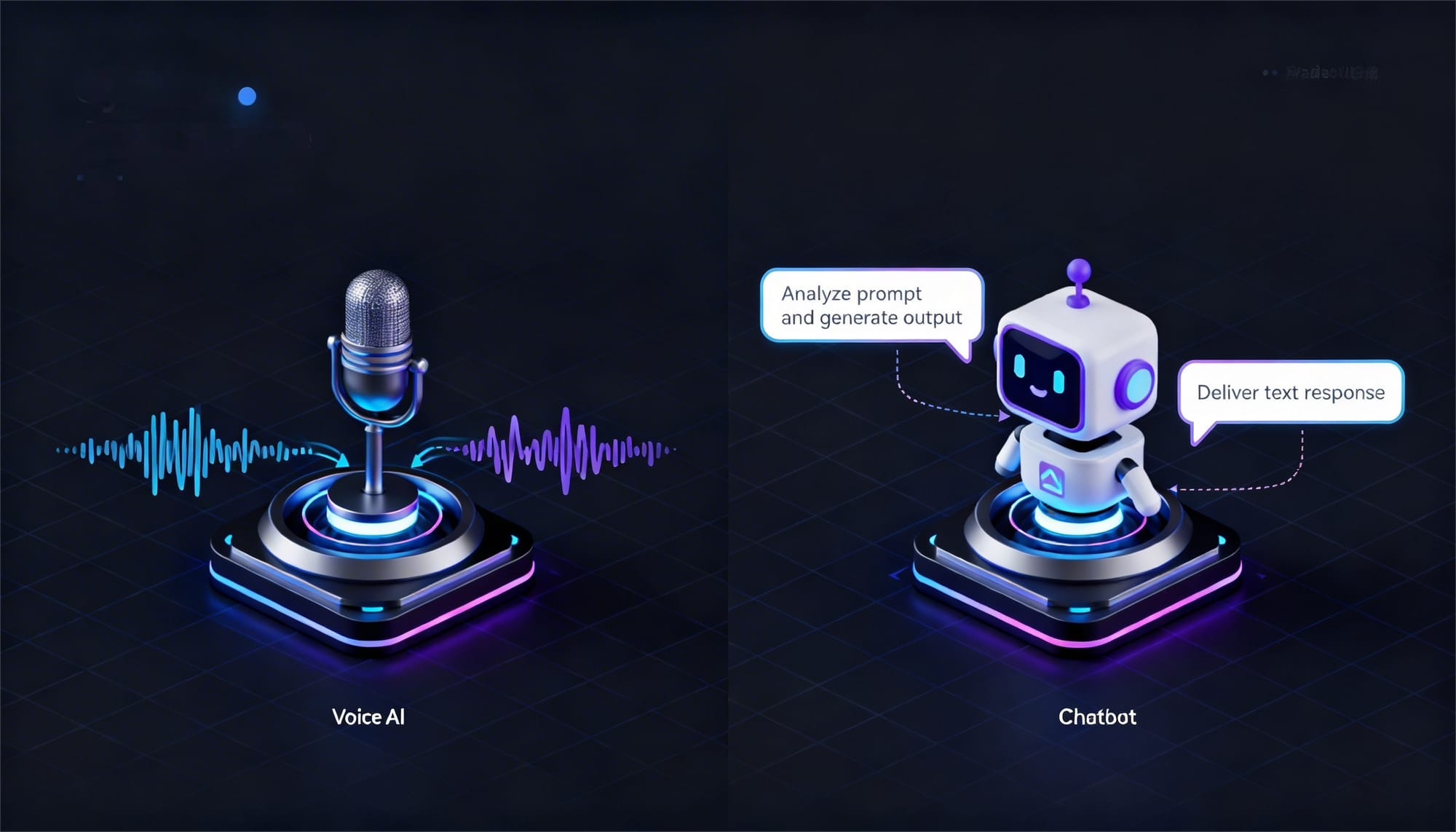
A chatbot processes text in a simple request-response flow: user input → LLM → response. A Voice AI system, however, must listen to speech, transcribe it, generate a response, and convert that response back into audio, all in real time.
These additional layers introduce new challenges such as latency management, streaming pipelines, speech recognition accuracy, and interruption handling.
Understanding these differences helps businesses decide when to use a chatbot and when Voice AI is the better conversational interface.
What is a Chatbot?
A chatbot is an AI-powered software system that interacts with users through text-based conversations. It processes user messages, understands intent using natural language processing (NLP) or large language models (LLMs), and generates relevant responses.
Chatbots typically follow a request–response model, where a user sends a text query and the system returns a text reply. They are commonly used in websites, mobile apps, and messaging platforms for tasks like customer support, FAQs, order tracking, and basic automation.
What is Voice AI?
Voice AI is a conversational AI system that allows users to interact with software using spoken language instead of text. It understands voice input, processes the request using AI models, and responds with synthesized speech.
Voice AI systems typically operate through a pipeline that includes speech-to-text (STT) to transcribe audio, a large language model (LLM) to generate a response, and text-to-speech (TTS) to convert the reply back into natural-sounding voice. These systems are commonly used in virtual assistants, call center automation, IVR systems, and voice-enabled applications.
Voice AI vs Chatbots: The Core Difference
While both chatbots and Voice AI rely on large language models to understand and generate language, the way they process interactions is fundamentally different. Chatbots handle text in a request–response cycle, whereas Voice AI operates as a real-time audio pipeline.
| Aspect | Chatbots | Voice AI |
Interaction Type | Text-based communication | Spoken conversation through audio |
System Model | Request–response system | Real-time audio processing pipeline |
User Flow | User sends text → LLM processes → response returned | User speaks → STT → LLM → TTS → audio response |
Processing Style | Mostly stateless and easy to cache or retry | Continuous streaming pipeline |
Latency Expectations | Users tolerate 2–5 seconds delay | Responses must be near real-time |
System Complexity | Relatively simple architecture | Multiple components with strict latency constraints |
User Experience | Typing and reading interaction | Natural conversational interaction |
Chatbot vs Voice AI Architecture
The architecture of chatbots and Voice AI systems differs mainly in how user input is processed. Chatbots handle text interactions in a simple request–response flow, while Voice AI systems rely on a real-time audio pipeline that processes speech, generates responses, and converts them back into voice.
Chatbot Architecture
A chatbot typically follows a straightforward pipeline where a user sends a text message, the system processes it using an AI model, and a response is returned to the interface.
Typical chatbot flow:
User Text Input → Backend/API → LLM Processing → Text Response → UI Display
Because chatbots operate on text, the system architecture is relatively simple. Communication usually happens through HTTP requests or APIs, and responses can be cached, retried, or processed asynchronously without affecting the user experience.
Voice AI Architecture
Voice AI systems require a more complex pipeline because they must process audio instead of text. The system listens to speech, converts it into text, generates a response, and then converts the response back into audio.
Typical Voice AI flow:
User Speech → Speech-to-Text (STT) → LLM Processing → Text-to-Speech (TTS) → Audio Response
Each stage adds processing overhead and introduces potential latency. To keep conversations natural, most Voice AI systems rely on streaming pipelines, where speech transcription, AI responses, and voice generation happen continuously rather than waiting for the entire process to complete.
Technology Stack Behind Voice AI Systems
Voice AI systems rely on a multi-layered technology stack because they must process spoken language in real time. Unlike chatbots that handle text directly, Voice AI must capture audio, convert speech into text, generate a response, and convert that response back into speech.
Chatbot Stack
Chatbots follow a simple text-based pipeline:

Walk away with actionable insights on AI adoption.
Limited seats available!

User Input (Text) → LLM → Text Response → UI
The user sends a message, the language model processes it, and the response is displayed in the interface. Because everything happens in text, chatbot systems are easier to build and typically work well with HTTP or REST APIs.
Voice AI Stack
Voice AI systems require a more advanced pipeline to handle spoken conversations:
Mic Input → Speech-to-Text (STT) → LLM → Text-to-Speech (TTS) → Audio Output
The system first captures voice input through a microphone. A speech-to-text (STT) engine converts the audio into text, which is then processed by a large language model (LLM) to generate a response. Finally, a text-to-speech (TTS) engine converts the response back into audio so the user can hear it.
Because this pipeline involves multiple stages, Voice AI systems must carefully manage latency, streaming, and system reliability to maintain a natural conversation experience.
Latency Challenges in Voice AI
Latency is one of the biggest challenges when building Voice AI systems. Unlike chatbots, where users can tolerate a few seconds of delay, voice interactions must feel near real-time to maintain a natural conversation. Even small delays can make the system feel slow or unresponsive.
A Voice AI pipeline includes multiple stages, speech recognition, language processing, and speech synthesis and each stage adds processing time. To keep the interaction smooth, developers must carefully manage the latency budget across the entire pipeline.
| Stage | Acceptable Latency Range |
Speech-to-Text (STT) | 200–400 ms |
LLM First Token | 300–600 ms |
Text-to-Speech (TTS) First Chunk | 100–200 ms |
Total Response Time | ~600 ms – 1.2 seconds |
In most Voice AI applications, anything above 1.5 seconds starts to feel slow or broken to users. By comparison, chatbots can still provide a good experience even with 3–5 seconds of response time. This strict latency requirement is one of the main reasons Voice AI systems are harder to design and optimize than chatbots.
Handling Interruptions in Voice AI Conversations
Interruptions are common in voice interactions. Users may start speaking while the system is still responding, and the system must react immediately. This behavior does not exist in chatbots, where users simply type a new message.
To handle interruptions, Voice AI systems must perform a few key actions in real time:
- Voice Activity Detection (VAD): Detect when the user starts speaking
- Stop TTS playback: Immediately stop the current audio response
- Cancel LLM generation: Stop the response that is being generated
- Restart processing: Transcribe the new speech and generate a new reply
Managing these steps requires coordination between the speech recognition, language model, and speech synthesis components, which makes Voice AI systems more complex than chatbots.
Where the Complexity Lives in Voice AI
Voice AI systems are harder to build because several components must work together in real time. Each stage affects latency, accuracy, and overall conversation quality.
Speech-to-Text (STT)
Tools like Whisper, Deepgram, and AssemblyAI convert speech into text. For real-time systems, streaming transcription is important because it processes speech continuously instead of waiting for the full audio.
LLM Backend
The language model generates the response. Voice AI systems usually rely on streaming completions, where tokens are returned as they are generated. Here, first-token latency matters more than total response time.
Text-to-Speech (TTS)
Services like ElevenLabs, OpenAI TTS, and Azure Speech convert text responses into audio. Responses are typically streamed sentence-by-sentence so the system can start speaking before the full answer is ready.
Transport Layer
Chatbots usually work with HTTP requests, but Voice AI systems require persistent connections like WebSockets or WebRTC to stream audio with minimal delay.
When to Use a Chatbot
Chatbots are suitable when the interaction is primarily text-based and real-time voice responses are not required. They are easier to implement and work well in environments where users prefer typing.
Use a chatbot when:
- The interface is text-native (websites, mobile apps, Slack, messaging platforms)
- Latency tolerance is moderate (responses within 1–5 seconds are acceptable)
- The conversation flow is simple or task-oriented
- You want faster development and iteration cycles
When to Use Voice AI
Voice AI is useful when interactions need to happen through spoken conversation rather than text. It works best in situations where users need a hands-free or real-time interface.
Use Voice AI when:
- The interaction requires hands-free or eyes-free operation
- The channel is phone or telephony (call centers, IVR systems)
- You are building voice assistants or ambient AI systems
- The conversation needs to feel fast and natural in real time
How to Build a Chatbot?
A basic chatbot can be built by sending user messages to a large language model (LLM) and returning the generated response. The conversation history is stored so the model understands context.
Example: Order Status Chatbot
from openai import OpenAI

client = OpenAI()
history = []

def chat(user_message):
    history.append({"role": "user", "content": user_message})

    response = client.chat.completions.create(
        model="gpt-4o",
        messages=[
            {"role": "system", "content": "You are an order support assistant."},
            *history
        ]
    )

    reply = response.choices[0].message.content
    history.append({"role": "assistant", "content": reply})
    return reply

# Usage
print(chat("Where's my order #1234?"))
In this example, the chatbot receives a user message, sends it to the LLM, and returns the generated reply. The conversation history maintains context, allowing the chatbot to respond accurately across multiple messages.
Walk away with actionable insights on AI adoption.
Limited seats available!
In most chatbot implementations, the flow is simple: HTTP request in, text response out, with the conversation state stored in memory or a database.
How to Build a Voice AI Agent?
Building a Voice AI system requires a real-time audio pipeline instead of a simple text request–response flow. The system must continuously listen to speech, convert it into text, generate a response, and speak the reply back to the user.
Example: Inbound Call Voice AI Agent
import deepgram  # STT
from openai import OpenAI
import elevenlabs  # TTS

client = OpenAI()

def handle_call(audio_stream):
    # Step 1: STT -- stream audio, get transcript in real-time
    transcript = deepgram.transcribe_stream(audio_stream)

    # Step 2: LLM -- stream completion, don't wait for full response
    response_stream = client.chat.completions.create(
        model="gpt-4o",
        messages=[
            {"role": "system", "content": "You are a clinic receptionist."},
            {"role": "user", "content": transcript}
        ],
        stream=True  # critical -- get tokens as they arrive
    )

    # Step 3: TTS -- speak each sentence as LLM generates it
    for sentence in chunk_by_sentence(response_stream):
        audio = elevenlabs.generate(text=sentence, stream=True)
        play(audio)
In this example, the system processes audio through three stages. Speech-to-Text (STT) converts the caller’s voice into text, the LLM generates a response, and Text-to-Speech (TTS) converts the reply back into audio.
Unlike chatbots, these stages typically run as streaming processes, allowing the system to start speaking before the full response is generated. This helps maintain a natural conversational experience.
Frequently Asked Questions?
What is the main difference between Voice AI and chatbots?
The main difference is how interactions are handled. Chatbots process text-based messages, while Voice AI systems process spoken input using speech-to-text and text-to-speech technologies.
Do Voice AI systems use the same LLMs as chatbots?
Yes. Voice AI and chatbots often use the same large language models such as GPT or Claude. The difference lies in the audio processing pipeline used before and after the model response.
Why is Voice AI harder to build than chatbots?
Voice AI systems require multiple real-time components including speech recognition, language processing, and speech synthesis, all of which must operate with very low latency.
What technologies are used in Voice AI systems?
Voice AI systems typically use speech-to-text (STT), large language models (LLMs), text-to-speech (TTS), and streaming infrastructure such as WebSockets or WebRTC.
When should businesses use a chatbot instead of Voice AI?
Chatbots are ideal for text-based interfaces like websites, mobile apps, and messaging platforms where users prefer typing and latency requirements are less strict.
Where is Voice AI commonly used?
Voice AI is widely used in call centers, virtual assistants, IVR systems, voice-enabled apps, and hands-free environments such as vehicles or smart devices.
Conclusion
Chatbots and Voice AI may use the same language models, but their architectures are very different. Chatbots follow a simple text-based request–response flow, while Voice AI systems operate as a real-time pipeline that handles speech recognition, language processing, and speech synthesis.
Because of this, Voice AI requires careful handling of latency, streaming, and system coordination. Chatbots are easier to build and work well for text interactions, while Voice AI is better suited for real-time spoken conversations, such as call automation and voice assistants.

Rabbani Shaik
AI enthusiast who loves building cool stuff by leveraging AI. I explore new tools, experiment with ideas, and share what I learn along the way. Always curious, always building!
Walk away with actionable insights on AI adoption.
Limited seats available!