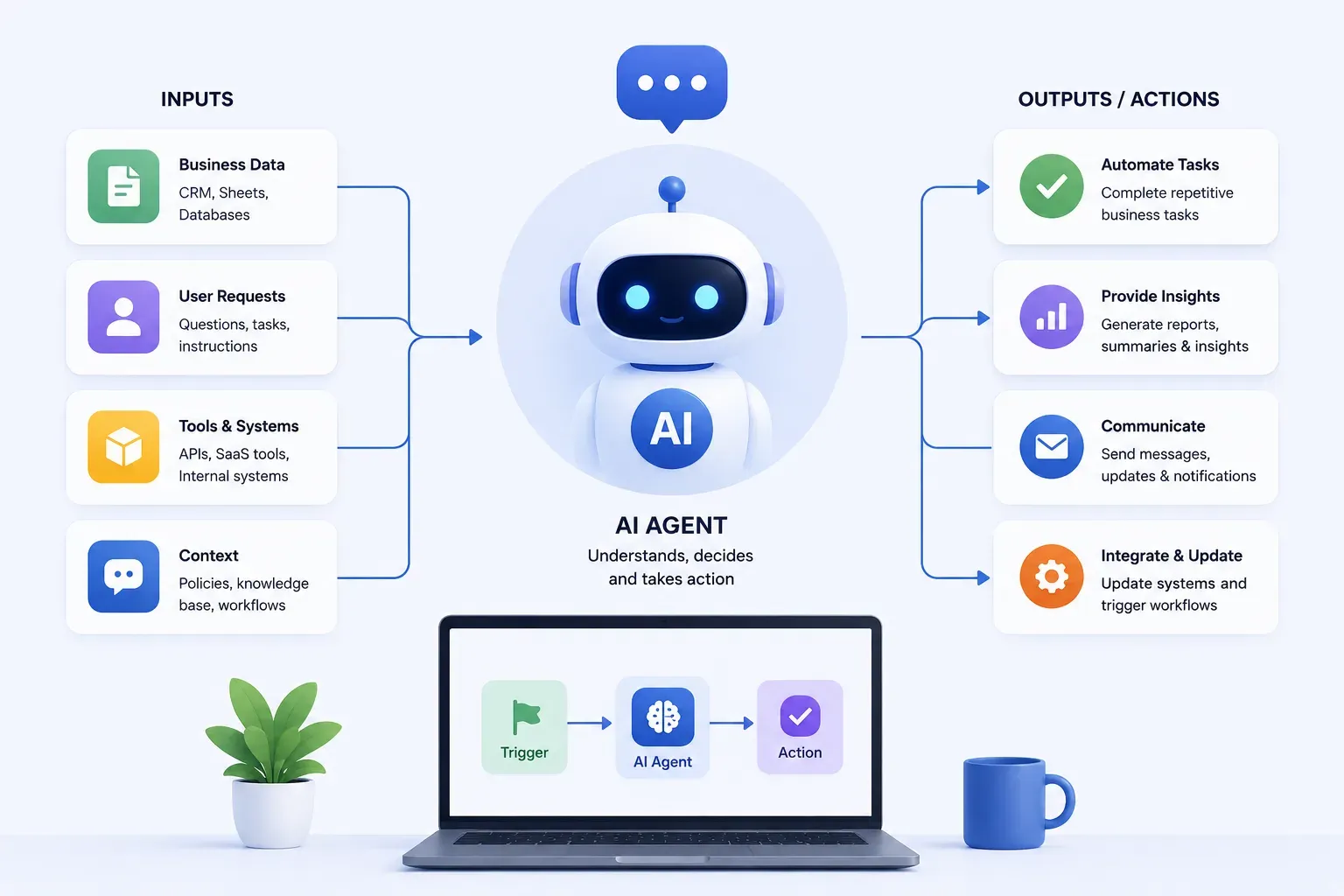
- An AI agent takes a goal and works toward it autonomously, unlike a chatbot (waits for messages) or traditional automation (fixed logic, breaks on unexpected input).
- Build one when a task is high-volume, moderately complex, and has enough variation that scripts keep breaking, not when it needs deep expertise or errors are hard to reverse.
- The 10-step process: define the workflow and its boundaries, map decisions explicitly, prepare the knowledge base, pick the simplest model/architecture that works, connect it to your tools safely, add human review, test on real edge cases, measure accuracy and reliability, then deploy and keep monitoring.
- A single-workflow agent typically takes 4–10 weeks to build; multi-agent systems with complex integrations can take 3–6 months.
- Sometimes the right answer is a no-code tool like Make or n8n instead, custom development only pays off when you need reliability and control they can't deliver.
AI agents are one of those things that sound more complicated than they are and also more straightforward than they actually are.
The concept is simple. Give an AI a goal, the right tools, and the right context, and it can handle multi-step workflows that previously needed a person sitting in front of a screen. The hard part is building one that works reliably in production, fits your actual business logic, and doesn't fall apart the first time an edge case shows up.
That's what this guide covers. How to go from a workflow you want to automate to an agent that runs it, step by step, with the decisions and tradeoffs laid out clearly.
What Is a Custom AI Agent?
A custom AI agent is a system that takes a goal, breaks it into steps, uses tools and data to work through those steps, and completes a task without needing someone to manage each decision along the way.
Unlike a chatbot that responds to questions or an automation script that follows fixed rules, an agent can reason through variation. It can handle inputs that don't fit a neat template, call external tools, and adapt when something unexpected happens.
The "custom" part means it's built around your specific business, your workflows, your data, your rules, and your systems. Not a generic assistant, but one that knows how your business actually operates.
How Custom AI Agents Work in Business Workflows
An AI agent works in a loop. It reads the situation, decides what to do next, takes an action, checks the result, and repeats until the task is complete.
Here's what that looks like in practice:
A support ticket comes in ↓Agent reads the ticket ↓Checks the customer's purchase history ↓Look for known issues matching the complaint ↓Can it resolve this directly?
→ Yes - drafts and sends a response→ No - routes to the right human with a context summary already written
All of that happens in under a minute. The human who picks up the escalated ticket gets full context, not a raw ticket they have to research from scratch.
The core components that make this work are a language model for reading, reasoning, and writing, tools like APIs, databases, and search functions the agent can call, and memory so the agent can track what it has already done within a workflow run.
More advanced setups involve multiple agents handing work to each other. But that's something you build toward, not where you start.
When Should You Build a Custom AI Agent?
Not every workflow needs an AI agent. A simple automation script will do the job better and cheaper in more cases than most teams want to admit.
Build an agent when:
- The task follows the same steps each time, but the inputs vary
- It eats hours of human time without needing senior judgment
- Your team has built workarounds, exception spreadsheets, Slack messages substituting for system logic, and manual checks before anything goes out
That last signal is easy to miss. Workarounds mean the process has more variation than rigid automation can handle. That's the gap agents are built for.
Skip the agent when:
- The task requires deep expertise and changes every time
- Errors are hard to reverse, or consequences are severe
- The workflow is simple and predictable, and automation is cheaper and more reliable
The sweet spot:
High volume. Moderate complexity. Enough variation that scripts break. Consequences that matter but aren't catastrophic.
Business Workflows Best Suited for AI Agents
Based on what's actually working in production right now, here are the workflow categories where teams are getting real results.
Recruiting and HR
Resume screening, candidate outreach, interview coordination, offer letter generation. These processes are repetitive, rule-heavy, and eat enormous amounts of recruiter time. Agents built for these workflows are some of the most impactful ones I've seen.
Customer support
Handling tier-1 queries, processing returns, checking order status, and routing complex issues. Not replacing your support team, but handling the volume of simple requests so your team focuses on the ones that actually need a person.
Sales ops
Lead enrichment, CRM hygiene, follow-up sequences, deal stage updates. Sales reps hate data entry. This is basically all data entry.
Finance and accounting
Invoice processing, expense categorization, reconciliation, financial report generation. Structured data, clear rules, high volume. Agents are very good here.
Content pipelines
Research aggregation, first drafts, SEO briefs, social adaptation of long-form content. The agent isn't replacing writers; it's handling the scaffolding so writers can focus on the judgment calls.
Custom AI Agent vs AI Chatbot vs Traditional Automation
These three get mixed up constantly, and using the wrong one for a workflow is one of the more expensive mistakes teams make. Here's how they actually differ.
Traditional automation tools like Zapier, Make, or Python scripts follow fixed logic. They're fast, cheap, and reliable, but only when inputs are predictable. The moment something unexpected happens, they break.
Chatbots are conversational and user-facing. They respond to what someone says, wait for the next message, and respond again. They're good at answering questions, but they don't go out and do things on their own.
AI agents are different from both. They're task-oriented and proactive, triggered by events, not just user messages. They can handle ambiguity, call external tools, take actions across multiple systems, and adapt when things don't go as planned.
A simple way to think about it:
| Traditional Automation | AI Chatbot | Custom AI Agent | |
How it works | Fixed logic, fixed steps | Responds to user messages | Takes a goal and works toward it |
Triggered by | Events or schedules | User input | Events, schedules, or other systems |
Handles variation | No | Partially | Yes |
Uses external tools | Only if hardcoded | Rarely | Yes — APIs, databases, search |
Takes autonomous action | No | No | Yes |
Best for | Predictable, repetitive tasks | Answering questions | Multi-step workflows with variable inputs |
Automation handles the predictable. Chatbots handle the conversation. Agents handle everything in between that currently requires a human to manage the process.
How to Build a Custom AI Agent for Your Business Workflow
Step 1: Identify the Workflow You Want to Automate
This is where most projects get set up for success or quietly fall apart before a line of code is written.

Walk away with actionable insights on AI adoption.
Limited seats available!

"Automate our sales process" is not a workflow. It's a wish. "Every morning at 9 am, pull new leads from the last 24 hours, check LinkedIn for their job title and company size, score them against our ICP, and add a task in HubSpot for the relevant rep with a personalized outreach suggestion", that's a workflow.
Start with the one you understand best, not the most impactful one. If you can clearly describe every step, every input, every output, and the key edge cases in 30 minutes, you're ready to build. If it takes three meetings and still feels fuzzy, get more clarity first.
Before opening your laptop, answer these:
- Who triggers this process?
- What information does it need to start?
- What does a good output look like?
- What are the three or four things that could go wrong?
Step 2: Define the Agent's Goal, Scope, and Boundaries
Once the workflow is clear, define exactly what the agent is responsible for, and what it isn't.
Goal: Make it outcome-focused. Not "the agent reads applications" but "the agent reduces time-to-first-response on job applications from 3 days to under 6 hours, at the same quality bar our recruiters use."
Scope: Define which parts of the workflow the agent runs autonomously and which it hands to a human. Start conservatively. Give the agent less than you think you could get away with. Expand autonomy once you've built confidence in the outputs.
Boundaries: Define what the agent must never do, regardless of context.
- Never send an email that commits to a price discount without approval
- Never delete records
- Never contact a customer who has opted out
- Never proceed if confidence falls below a set threshold
Write all three down explicitly before development starts. They become the specification your team builds against and the checklist you use before shipping.
Step 3: Map the Workflow Into Tasks and Decisions
Break the workflow into its smallest pieces. At each step, ask one question: is this something to do, or something to decide?
Tasks are concrete actions: fetch data, write text, send a message, create a record, look up a value.
Decisions are branches. Is this customer eligible? Can the agent handle this query, or does it need a human? Does this invoice match?
For every decision, define the criteria in terms that the agent can actually evaluate. "High-value customer" means nothing to an agent. "Customers with lifetime spend over $10,000, or any enterprise tier account, or any account active for more than 24 months" does.
This exercise also forces you to confront edge cases, the 15% of situations that don't fit the happy path. Those are where agents most commonly fail in production. Document them now, decide how each should be handled, and build those decisions in explicitly. Don't leave them for the agent to figure out at runtime.
Step 4: Prepare the Data, Knowledge Base, and Business Rules
An agent's quality ceiling is set by the quality of information it has access to. This step gets underinvested almost every time; teams spend weeks on architecture and a few hours on the knowledge base. It should be closer to the other way around.
What your agent needs to know:
- Product details, pricing tiers, company policies
- Common questions and the right answers to them
- Examples of good outputs and bad ones, because showing what not to do helps
- Domain-specific language and terminology your business uses
Where different knowledge lives:
| Knowledge Type | Where It Goes |
Look up information (FAQs, specs, policies) | Vector database - queried at runtime |
Business rules and constraints | System prompt - always present |
Examples of good outputs | Few-shot examples or fine-tuning data |
Business rules deserve special attention. They're not general knowledge; they're prescriptive. They don't describe how things are; they dictate what the agent must always do regardless of context. Collect these from your team before development starts, not during.
Step 5: Choose the Right AI Model and Agent Architecture
The core advice here is simple: start with the simplest setup that could work, and add complexity only when you have a clear reason to.
Choosing the model
Start with a frontier model, GPT-4o, Claude Sonnet, or similar. They're more expensive than smaller models but significantly better at reasoning through complex tasks, handling ambiguity, and following detailed business rules. Once the agent is working well, test whether a smaller, cheaper model handles it adequately. Switch if it does.
Choosing the architecture
Start with a single agent handling the full workflow. Multi-agent systems, with a planner, specialized workers, and a verifier, are powerful but considerably harder to build and debug. Add that layer only when a single agent genuinely can't handle the task.
Choosing the framework
| Framework | Best For |
LangChain / LlamaIndex | Single agents, large community, good tooling |
CrewAI / AutoGen | Multi-agent workflows |
Direct API | Maximum control, less abstraction to debug |
For many production agents, building directly on the model provider's API is the more reliable path. Frameworks add convenience but also add layers that can fail in hard-to-diagnose ways. Know the tradeoff before you pick.
Step 6: Connect the Agent With Business Tools and APIs
This is often what takes the most calendar time, even though the concepts are straightforward. Your agent needs to read from and write to the systems your business runs on — CRM, email, databases, project management tools, internal APIs. Each connection is a tool the agent can call.
Four things to get right:
Scope permissions carefully
Give the agent the minimum access it needs. Not admin credentials, just what the workflow requires.
Handle authentication securely
Use environment variables and secrets management. No hardcoded credentials anywhere in the codebase.
Build error handling for every API call
APIs fail, rate limit, return unexpected data, and time out. Your agent needs to handle all of these gracefully rather than crashing mid-workflow.
Design for idempotency from the start
If the agent creates a task in Jira and then fails halfway through, will it create a duplicate on retry? A well-designed agent produces the same result whether the workflow runs once or twice.
Step 7: Add Human-in-the-Loop Controls
Human-in-the-loop controls are not a crutch you use until the agent is "good enough." They're a core feature of a responsible production system. The question isn't whether to have them; it's where to place them and when to adjust them based on evidence.
At launch, add approval checkpoints wherever the agent is about to take an action that's hard to reverse, sending an external email, writing to a production database, or making a financial commitment. Keep those checkpoints until you've reviewed enough outputs to trust the agent's judgment.
After launch, track the approval rate:
| Approval Rate | What It Signals |
95%+ approved without edits | Safe to remove that checkpoint |
40–60% is being edited before approval | The agent needs work before expanding autonomy |
One thing worth doing consistently: capture every edit a human makes to an agent's output. Those edits are the clearest signal of where the agent is falling short, and the most direct input for improving it.
Full autonomy isn't the goal. The right level of autonomy, with evidence to back it up, is.
Step 8: Build and Test the AI Agent Prototype
Start with the happy path, the most common case, with clean inputs, where everything goes right. Get that working end-to-end before touching a single edge case. It gives you a working baseline and something concrete to show stakeholders early.
Then layer in complexity in order:
- Error handling
- Edge cases
- Performance optimizations
For testing, build a dataset of test cases before you start evaluating, not after. Include normal cases, common edge cases, and the failure modes you documented during workflow mapping. Run the agent against all of them and compare outputs against what a human expert would do.
Two things matter most:
Does it get the right answer?
Measure accuracy against your ground truth dataset.
Does it fail gracefully when it doesn't know?
An agent that confidently produces wrong output is more dangerous than one that says, "I'm not sure, flagging for review." Build uncertainty expressions early and treat them as a feature, not a weakness.
Step 9: Evaluate Accuracy, Reliability, and Workflow Impact
Before you go to production, you need numbers.
Walk away with actionable insights on AI adoption.
Limited seats available!
Accuracy is whether the agent's outputs are correct. This requires a ground truth. A set of inputs where you know what the right output is, so you can compare. For some tasks (classification, data extraction) this is easy to score automatically. For others (written responses, recommendations), you need human reviewers.
Reliability is whether accuracy holds at scale. Run the agent on hundreds of test cases and look at the variance. In practice, consistent 88% accuracy is more useful in production than results that swing between 65% and 98% depending on the input; predictability matters as much as peak performance.
Workflow impact is the business-level evaluation. How much time does this save? How much faster is the process? How does the error rate compare to before? This is the number your stakeholders care about, and having it clearly before launch makes the internal conversation much easier.
Don't skip this step. Teams that go straight from "it seems to work" to "let's ship it" are the ones who end up fire-fighting in production.
Step 10: Deploy, Monitor, and Improve the Agent
Deployment is not the finish line. The post-launch phase is where most of the real value gets unlocked — and where most teams stop paying attention.
In the first few weeks, manually review a sample of agent outputs every day. Not because you distrust the system, but because real production traffic always surfaces things your test set didn't cover. New edge cases, prompting issues, integrations that behave slightly differently than documented. This is normal. Expect it.
Set up alerting for what matters:
- High error rates
- Low confidence scores
- Unusual latency
- Failed API calls
You want to know about problems before your users do.
Build an improvement cycle. Every month or quarter, review the cases where the agent failed or where humans overrode its output. Use those to improve the system prompt, add examples to the knowledge base, or fix integration issues.
The agents that deliver long-term value are the ones with a team that stays engaged after launch. The ones that get abandoned tend to drift, fail silently, and eventually get rebuilt from scratch, at full cost, a second time.
Example: Custom AI Agent for a Business Workflow
A recruiting firm was processing around 600 job applications a week. Three recruiters were spending most of their time on initial screening, reading resumes, checking them against a rubric, writing notes in the ATS, and either scheduling a call or sending a rejection. The answer was usually clear within 90 seconds of reading. The problem was there were 600 of them.
What they built:
When a new application comes in through the ATS webhook, the agent:
- Reads the resume and questionnaire responses
- Evaluates the candidate against a structured scoring rubric
- Writes a detailed evaluation note into the ATS with reasoning
- Routes the application based on the result:
| Outcome | Action |
Clearly meets the bar | Advances to scheduling, triggers outreach |
Clearly doesn't meet the bar | Triggers rejection email |
Borderline | Flags for human review with a summary of uncertain factors |
Two months after launch:
- 80% of applications are handled fully autonomously
- Time-to-first-response dropped from 3 days to under 4 hours
- Human review cases dropped from 25% to under 12% as the rubric was refined
- Recruiters now spend their time on candidates who actually made it past screening
That's what a well-scoped, well-built agent looks like in production.
How F22 Labs Helps Build Custom AI Agents for Business Workflows
F22 Labs is an AI development company that has built custom AI agents for recruiting automation, document processing, customer support, and multi-step evaluation workflows for startups and scaling businesses that need production-ready systems.
We start with the workflow, not the code, mapping what's happening today, where the bottlenecks are, and where edge cases will cause problems. From there, our AI developers handle architecture, development, integrations, and monitoring, and stay engaged through the first weeks in production.
If you're figuring out whether an agent makes sense for a specific workflow, our case studies are a good starting point.
Conclusion
Building a custom AI agent is less about the technology and more about how well you understand the workflow you're automating. The teams that get real results are the ones that spend time mapping the process, defining boundaries clearly, and building with human oversight from the start, not the ones that move fastest.
The steps in this guide aren't complicated. But skipping any of them is usually where things go wrong, in production, not in development, where the cost of fixing them is higher.
Start with one workflow. Build it well. Expand from there.
Frequently Asked Questions
What's the difference between an AI agent and a chatbot?
A chatbot responds to messages. An AI agent takes a goal, makes decisions, uses tools, and completes multi-step workflows without waiting for human input at each step.
Do I need to train a custom AI model?
Almost never. Modern agents run on existing foundation models using prompt engineering and retrieval. Fine-tuning is only worth exploring after deployment, when you've identified gaps that prompting can't fix.
How long does it take to build one?
A single-workflow agent typically takes 4–10 weeks. Multi-agent systems with complex integrations can take 3–6 months. The biggest variable is how clearly the workflow is defined before development starts.
What happens when the agent makes a mistake?
Good agents flag uncertain outputs for human review rather than failing silently. Logging failures with enough context to debug them is what turns individual mistakes into system improvements over time.
Is our business data safe?
It depends on how the agent is built. For sensitive data, options include enterprise API agreements, locally hosted models, or data masking before anything leaves your infrastructure. This needs to be decided before architecture, not after.
Can it integrate with our existing tools?
Yes. Most business tools have APIs; Salesforce, HubSpot, Jira, Slack, Gmail, and custom databases are all common targets. Effort depends on API quality and what the agent needs to do within each system.
When does a no-code tool make more sense?
When the workflow is simple and fits standard integrations. Tools like Make or n8n get you 80% of the way at 20% of the cost. Custom development makes sense when you need reliability and control that they can't deliver.

Walk away with actionable insights on AI adoption.
Limited seats available!



