How to Write a Good Defect Report in Software Testing

Defect reporting often feels simple until a poorly written report slows down fixes, creates back-and-forth, or gets ignored altogether. I’m writing this guide for testers who want their defect reports to be understood quickly, reproduced accurately, and resolved without unnecessary clarification cycles.
This article focuses on how to structure a defect report so it communicates impact, context, and reproduction steps clearly, helping teams fix issues faster and improve overall software quality. Therefore, the need for the creation of a precise, comprehensive, and correct defect report is necessary to ensure that bugs are tackled efficiently.
In this blog, we run through the critical elements of a good defect report and some tips on how to make it more effective.
What Is a Defect Report?
A defect report documents a deviation between expected and actual system behavior in a way that allows developers to understand, reproduce, and fix the issue efficiently. Well-written defect reports reduce ambiguity. Poorly written ones introduce delays, misinterpretation, and rework. The goal of a defect report is to explain the problem in enough detail that developers can understand, reproduce, and fix the issue.
Good defect reports save time by clearly communicating the problem. Poorly written reports, on the other hand, can lead to confusion, delays, and rework.
Why Is a Good Defect Report Important?
A good defect report acts as a single source of truth for an issue. It ensures:
- Faster reproduction by developers
- Reduced clarification cycles
- Better prioritization and triage
- Higher overall software quality
Clear reporting directly impacts how quickly defects move through the bug lifecycle.
Key Elements of a Good Defect Report

To write a good defect report, include the following key elements:
1. Title
The title should summarize the defect clearly and concisely, allowing teams to understand the issue at a glance without opening the report.
Example: “Login button unresponsive on mobile after entering invalid credentials.”
2. ID
A unique defect ID ensures traceability throughout the defect lifecycle and avoids confusion when tracking fixes across tools and releases.
Example: Bug ID: #1234
3. Environment
Environment details help isolate platform-specific issues. Missing or vague environment data is a common reason defects cannot be reproduced.
Example: “Tested on Android 11, Chrome version 94.0, App version 2.3.1.”
Sleep Easy Before Launch
We'll stress-test your app so users don't have to.
4. Severity and Priority
- Severity refers to how critical the defect is in terms of software functionality. Common categories include Critical, Major, Minor, and Trivial. Understanding the difference between severity vs priority is essential for effective defect management.
- Priority determines how soon the defect needs to be fixed. Priorities include High, Medium, and Low.
- Severity reflects functional impact, while priority determines fix urgency. Distinguishing the two helps teams allocate effort correctly and avoid misaligned expectations.
Example: Severity: Major, Priority: High
5. Description
The description should explain what is happening, why it is incorrect, and how it affects the system, without assumptions or proposed fixes.
Example: “When a user enters incorrect login credentials and clicks the 'Login' button on the mobile app, the button becomes unresponsive, and no error message is shown. The expected behavior is for the system to display an error message without freezing the login button.”
6. Steps to Reproduce
Clear, sequential reproduction steps are essential. If a defect cannot be reproduced reliably, it is unlikely to be fixed correctly.
Example:
- Open the mobile app.
- Navigate to the login screen.
- Enter an incorrect username and password.
- Click on the ‘Login’ button.
- Observe the unresponsive button.
7. Expected Result
The expected result defines correct system behavior and serves as the baseline for validation after a fix is applied.
Example: “The system should display an error message such as ‘Invalid username or password’ and allow the user to try logging in again.”
8. Actual Result
The actual result describes the observed behavior precisely, without interpretation or speculation.
Example: “The 'Login' button becomes unresponsive after clicking it, and no error message is displayed.”
9. Attachments
Screenshots, logs, and videos reduce investigation time by providing visual or technical evidence of the defect.
Example: Attach a screenshot showing the unresponsive button or a video capturing the steps to reproduce the bug.
10. Additional Information
Supplementary details such as error logs, frequency, or platform differences help developers diagnose edge cases faster.
- Error messages: Copy any error messages that appear during the defect.
- Network logs: Include logs if the issue might be related to server or network communication.
- Frequency: Mention how often the bug occurs (e.g., “It happens every time” or “Occurs sporadically”).
Example: “Occurs every time on Android, but not reproducible on iOS.”
Example of a Good Defect Report
Title: "Search Function Not Returning Results on Product Page in Firefox"
- Bug ID: #3456
- Environment: Firefox version 93.0, Windows 10
- Severity: Major
- Priority: Medium
- Description: When using the search function on the product page in Firefox, the results do not display, even though the same search works correctly in Chrome.
- Steps to Reproduce:
- Open Firefox on Windows 10.
- Navigate to the product page of the e-commerce website.
- Enter a product name in the search bar.
- Click the search button.
- Expected Result: A list of products matching the search query should be displayed.
- Actual Result: No results are shown, and the page remains blank.
- Attachments: Screenshot of the blank page after clicking search.
- Additional Information: Works as expected in Chrome and Safari. No error messages appear in Firefox Developer Console.
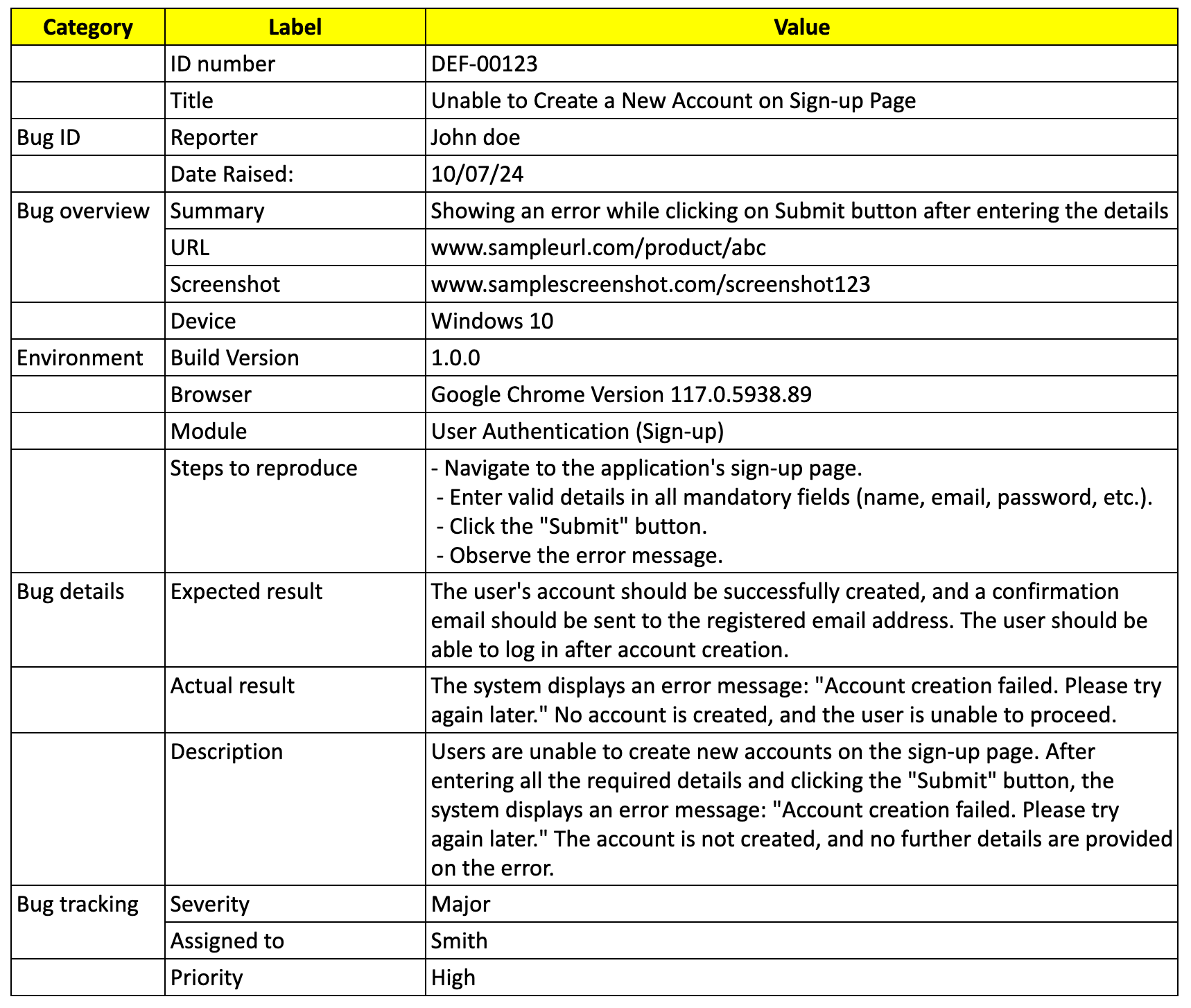
Sample Defect Report in Software Testing
A complete defect report combines context, reproduction steps, and observable outcomes in a single, consistent format, making it easier to triage and resolve.
Best Practices for Writing Defect Reports
- Be Clear and Specific: Avoid vague language. Make sure the report is specific and detailed enough for developers to understand without needing to ask for more information.
- Stay Objective: Stick to facts and avoid assumptions. Report only what you observe, not what you think the problem might be.
- Use Simple Language: Write the defect report in simple, straightforward language that can be understood by anyone, regardless of their technical background.
- Be Consistent: Use a consistent format for all defect reports. This makes it easier for the team to understand and process multiple reports.
- Proofread Before Submitting: Double-check your defect report for accuracy and completeness before submitting. A typo in a step or missing information could lead to delays in resolving the issue.
Sleep Easy Before Launch
We'll stress-test your app so users don't have to.
FAQs
1. What makes a defect report effective?
Clarity, reproducibility, accurate environment details, and objective descriptions make a defect report effective.
2. Should defect reports include possible solutions?
No. Defect reports should focus on observed behavior, not assumptions about fixes.
3. Why are steps to reproduce so important?
They allow developers to consistently recreate the issue and verify fixes reliably.
4. What is the difference between severity and priority?
Severity measures impact on functionality; priority defines how urgently the defect should be fixed.
5. Can poor defect reports delay releases?
Yes. Unclear reports often lead to rework, misprioritization, and delayed fixes.
Conclusion
A well-written defect report shortens resolution time, reduces misunderstandings, and improves collaboration between testers and developers. Clear titles, reproducible steps, and precise results turn defect reporting into a productivity driver rather than a bottleneck.
Developing this skill improves both individual testing effectiveness and overall team efficiency. Once written clearly, a defect report ensures that a bug is understood, reproduced, and finally fixed in less time than would have been required with an ambiguous report to meet the quality of the software. You are making a big contribution to the efficiency of the testing and development process by including clear titles, step-by-step details for reproducing, expected and actual results, and attachments relevant to the findings. Keep practicing these skills, and soon writing defect reports will become second nature!
Effective defect reporting goes hand in hand with other testing practices. Familiarizing yourself with types of automation testing and writing effective test cases can significantly improve your defect reporting skills.

Surya
I'm a Software Tester with 5.5 years of experience, specializing in comprehensive testing strategies and quality assurance. I excel in defect prevention and ensuring reliable software delivery.