System Integration Testing (SIT): A Complete Guide

System Integration Testing (SIT) is one phase that teams often underestimate, until integrations start breaking in environments that already “worked fine” in isolation. I’m writing this guide for that exact moment, when unit tests pass but real system behavior still feels unpredictable.
This article explains SIT from a practical engineering lens: why it exists, where integrations usually fail, and how structured testing approaches, tools, and checkpoints reduce late-stage risk. Whether you’re validating APIs, workflows, or data consistency across systems, this guide focuses on making SIT intentional, measurable, and production-ready.
What is System Integration Testing?
System Integration Testing (SIT) is a critical phase in the software development lifecycle. SIT testing involves integrating individual system components, separate modules, and subsystems, and then testing them together as one entity. The main objective of system integration testing is to ensure that the interactions among different modules are working well as intended.
Importance of System Integration Testing (SIT)
Detects Integration Issues Early: Integration testing can identify interface, data flow, and interaction issues between different components early in the development process.
Maintains Data Integrity: SIT validates that data remains accurate, complete, and consistent as it moves across system boundaries, especially critical in workflows involving transactions, state changes, or regulatory data. This is particularly vital in enterprise systems where inaccurate information can lead to great loss, such as health care or financial software.
Check Out System Work-flow: System integration testing verifies the complete workflow of a system by testing interactions between different modules.
Lower Risk: Because SIT verifies that an integrated system works properly, it reduces the possibility of critical failures in the production environment. In other words, it makes certain that a system meets its functional requirements and can support real-world scenarios.
Enhance Quality: SIT testing ensures that integrated defects are discovered early on. It also guarantees that all components operate harmoniously throughout the phase of product delivery.
Effective Approaches To The Testing of Integrated Systems
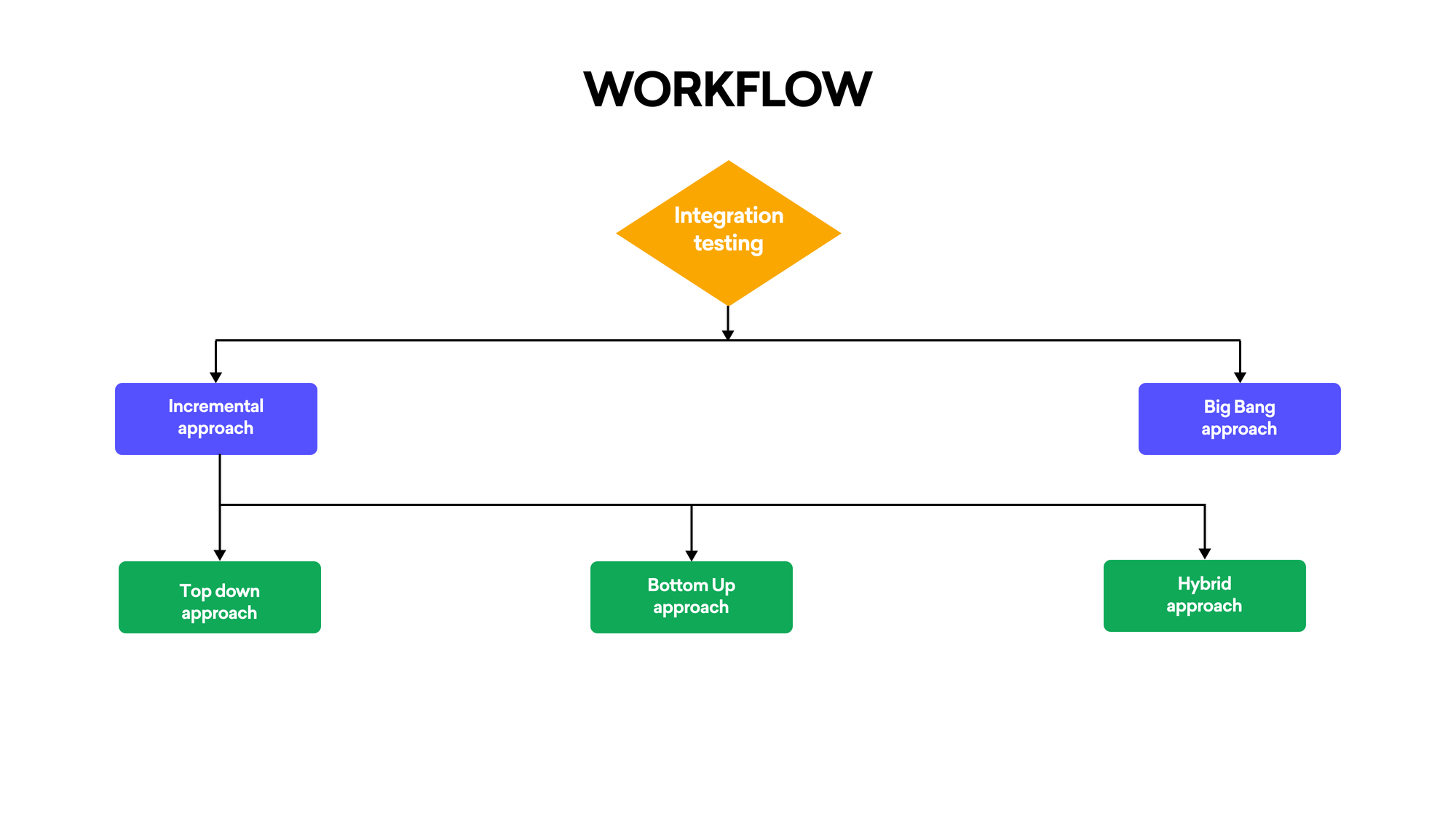
1. Incremental Approach:
This approach integrates and validates one module at a time, allowing failures to be isolated at the exact integration point. It provides controlled visibility into system behavior as complexity increases, making root-cause analysis significantly more reliable.
Top-Down Approach:
It is a method in which the first tests are carried out on Modules at high levels, and this is followed by testing modules at lower levels. Stubs can be used to simulate the action of lower-level modules that have not completed development or incorporated yet.
Bottom-Up Approach:
Using this method, all modules are tested at a low level, first of all, gradually going up towards high levels. Drivers can be used to simulate the inputs given to low-level modules.
Hybrid Approach/Sandwich Testing:
This approach consists of both after and before testing of complex modules, starting from a few combination modules and gradually incorporating more, it can make full use of the top-down and bottom-up approach.
2. Big Bang Approach:
All modules are integrated and tested simultaneously. While faster to execute, this approach increases diagnostic complexity, as failures cannot be easily traced to specific interfaces or dependencies.
Tool Used in System Integration Testing
Selenium
A tool to automate web-based applications. It can ensure that interactions between modules work well together.
Postman
Postman is used to validate API-level integrations by verifying request-response behavior, payload structure, status handling, and data consistency between interconnected services.
SoapUI
A powerful tool (for testing SOAP and REST web services). It is indispensable in proving that the integration of different services does work.
Jenkins
It is used for what is known as continuous integration, or CI: it automatically fires up the integration work and helps prevent code from breaking existing functionality.
JUnit/TestNG
By creating test cases which check if modules interact properly, integration testers would depend on a framework
Apache JMeter
It can be thought of as a tool for stress testing and performance measurement that is especially useful in field-like settings, but it is also one of the few applications capable of testing system stability and response under various load conditions.
The Points for SIT That Have To Be Checked

Interface Testing
- Interface Testing ensures that contracts between modules, request formats, response structures, and error handling remain consistent and compatible across system boundaries.
Sleep Easy Before Launch
We'll stress-test your app so users don't have to.
Data Flow Testing
- We can assure you that data moves as it should from one modular facility to another, if correct.
Error Handling
- Test how the integrated system handles errors. In particular, what happens when an error is generated by one module for another module?
Dependency Testing
- If a breakdown occurs in one module, check for dependent s. or modular blocks that will produce the failure still of the entire system.
Business Logic Validation
- Make sure that the business logic functions across all modules as intended.
Performance Testing
- Check that as it is used under load, the integrated system meets all its performance requirements.
Security Testing
- Check for compliance with system security requirements, including authentication, authorization, and data protection.
Suggested reads- 10 Types of Automation Testing You Need To Know
Entry Criteria for System Integration Testing (SIT)
Before carrying out System Integration Testing, the following conditions must be satisfied:
Module Development Completed
All individual modules have completed unit testing and meet defined acceptance criteria, ensuring SIT focuses on integration behavior rather than isolated functional defects.
Integration Plan Available
There is a detailed integration plan, setting out the sequence in which modules will be integrated and tested.
Test Environment Setup
The test environment is completely operational as opposed to being merely in one part or another of some process and set up; including the hardware software configuration, network setup and any necessary stubs or drivers needed for testing.
Prepared Test Cases
All possible interactions between modules have also been thoroughly tested with a range of checks and balances: positive & negative scenario-based, with relevant data(there is no reference if this is automated).
Prepared Test Data
The relevant test data has been created so that the integration test may be performed now.
Prepared dependencies
Now that any external dependencies imported from other suppliers have been successfully integrated into the project's source code, a formerly problematic factor where it lay ready for further testing.
Prepared Test Tools
Test tools needed for this round such as automation frameworks and API testing tools are installed and operating.
Exit Criteria for System Integration Testing (SIT)
SIT is considered complete when the following conditions are satisfied:
Test Case Execution
All test cases planned have been executed, including regulated testing.
Defects Corrected
All discoverable defects were recorded, repaired, checked, and closed off. There are no longer any major defective parts
Test Coverage Obtained
Sufficient coverage confirms that all critical interfaces, data paths, and cross-module interactions have been exercised under expected and edge-case conditions.
Performance Benchmarks Reached
Under anticipated load conditions, the integrated system attains its required performance benchmarks.
Security and Compliance Approved
Security tests have been carried out, and the system conforms to relevant safety and privacy regulations.
Stakeholder Sign-Off
The test results have been reviewed and accepted by stakeholder people. This includes representatives of development departments, testing sections and business teams.
Document Update
All documents related to the trial, which include test cases, test findings and bug logs, were updated and stored for future reference.
Output from System Integration Testing (SIT)
The output of SIT includes the following deliverables:
Test Completion Report
A review of SIT activities brings the following information: the number of test cases run, passed, failed, and all bugs found throughout testing.
Bug Tracking Log
A list of all the bugs from SIT, their severity and conditions, and what we did about each one.
Test Case Results
A note of the outcome of each trial, detailing whether the test passed or failed. Any comments are also included for interest.
Sleep Easy Before Launch
We'll stress-test your app so users don't have to.
Performance Security Assessment
Performance and security assessment reports produced after the SIT had been completed, together with any problems found and how they were solved.
Updated Test Cases
Test cases which have been made current through SIT changing any test cases are not reflecting the reality of the system now.
Sign-Off Document
A formal sign-off letter stating that SIT has been completed successfully and the integrated system is ready for the next stage of testing or deployment
System Integration Test Plan
A System Integration Test Plan is a strategic document that outlines how pieces of integrated systems will be tested to see if the changes intended by a set of components should pass or fail. As a manual tester, this plan typically includes the following:
Scope: Defines the components and interfaces to be tested, focusing on key integration points.
Test Objectives: Tells what you want to accomplish, such as testing how data flows through an interface and whether messages can pass error-free across different parts of an integrated system.
Test Environment: Describes the setup, including hardware, software, and network configurations that are identical to those in production.
Test Scenarios: Lists special cases which are to be tested -- all possible interaction types between pieces of integrated components.
Data for Testing: Explains the data needed for the test and how to produce or obtain it.
Basic entry-and-exit conditions: Indicates when tests begin and what counts as satisfactory completion.
Tasks and Responsibilities: Divide up tasks among team members, ensuring clarity in execution.
Challenges in System Integration Testing and Solutions
Challenge: Complexity of Interactions
Solution: An incremental or hybrid approach can be used to gradually integrate and test parts. In this way, the system is more manageable and any problems can often be fixed quickly.
Challenge: Relying on External Systems
Solution: You can employ mock-ups or proxies to model the behavior of external systems, thus running tests without the need for the original hardware.
Challenge: Data Inconsistency
Solution: Strong data validation checks should be implemented to ensure data consistency across all modules. Because it is a waste of time to check data validity manually, tools like Postman or JUnit can be used for automated verification.
Checklist for System Integration Testing
- Record and document all modules and interfaces.
- Create test cases for every conceivable module interaction.
- Make sure you have the right test data and that it is valid.
- Establish the test environment with any necessary stubs and drivers.
- Execute the integration test suite, starting with simple and working up to more complex scenarios.
- Verify data flow, interface response, and error handling
- Information on test results should be recorded and analyzed. Any defects ought to be documented as well
- After fixing a bug, test it in all required areas of test coverage
- Check up on the findings and adjust test cases so that they encompass all possible cases.
Real-Time Examples of System Integration Testing
E-commerce Platform Integration
An online store integrates its payment gateway, inventory management system, and user authentication service. SIT ensures that a single user action, placing an order, correctly triggers payment processing, inventory updates, and order history creation without data loss or workflow breaks.
Healthcare Application
A medical application has to take patient management, diagnostic tools, and billing systems with it. The result is SIT, which verifies data from one system and makes its way properly into another; the correct diagnostics and bills get sent.
Banking System Integration
A bank's software integrates with external financial networks, ATM machines (the cash machine), and a major online interface for all aspects of the banking business.
Conclusion
System Integration Testing plays a decisive role in validating that a system works as a cohesive whole, not just as independent components. By focusing on interfaces, workflows, and real execution paths, SIT reduces deployment risk and strengthens overall system reliability. By addressing integration issues early, maintaining data integrity, and verifying work processes, SIT ensures a reliable, high-quality product.
Proper planning, effective communication, and the right tools and approaches can all help to solve the problems in SIT. With a comprehensive checklist and thorough testing procedures, SIT can greatly reduce the risk of final product defects and ensure it meets user expectations and business requirements.
Frequently Asked Questions
1. How long does System Integration Testing usually take?
The duration of SIT varies depending on the project's size and complexity. It can range from a few days for small projects to several weeks for large, complex systems with many integrated components.
2. What are the main challenges in System Integration Testing?
Common challenges include managing complex system dependencies, coordinating between different teams, handling data inconsistencies across modules, and simulating real-world scenarios. Proper planning and communication are crucial to overcome these obstacles.
3. Can System Integration Testing be automated?
Yes, many aspects of SIT can be automated using tools like Selenium, Postman, or JUnit. Automation can improve efficiency and consistency, especially for repetitive tests. However, some complex scenarios may still require manual testing.

Binju K O
I’m a dedicated QA professional with 5 years of experience, passionate about delivering flawless software and sharing valuable insights to inspire and empower others in the tech world