State Transition Testing Techniques in Software Testing: Ultimate Guide
I’ve worked on several state-heavy systems where bugs didn’t come from features themselves, but from what happened between actions. Login attempts, retries, locks, unlocks, and edge conditions are where most failures hide.
That’s exactly why State Transition Testing matters. This guide is written to help testers and developers confidently validate systems where behavior depends not just on inputs, but on what state the system was already in.
By the end of this guide, you’ll know how to model states clearly, design reliable test scenarios, and catch transition bugs early, before they reach production. This black-box testing technique is crucial for validating systems where outputs depend on both current inputs and previous states.
By reading this guide, you'll understand state transition testing fundamentals, learn to create effective test scenarios, and improve your testing approach. Whether you're a QA professional or developer, these insights will help you test state-based applications more effectively.
What is State Transition Testing?
State Transition Testing is a black-box testing technique I rely on whenever system behavior changes based on previous actions. Instead of validating isolated inputs, this approach verifies how a system moves from one state to another when events occur.
It’s especially effective for workflows like authentication systems, payment processing, and approval flows, anywhere the history of actions affects the outcome.
Key Components of State Transition Testing
State: Represents the current status of the system.
When I break down a state-based system, I always start with four core elements: states, transitions, events, and actions. These elements together define how the system behaves over time, not just at a single moment.
Thinking in these terms makes hidden edge cases visible early, especially in complex user journeys.
For instance, when your phone is in a "locked" state, it only displays basic information and requires authentication to access other features. Understanding these states is crucial because they determine how your system behaves and what actions are possible.
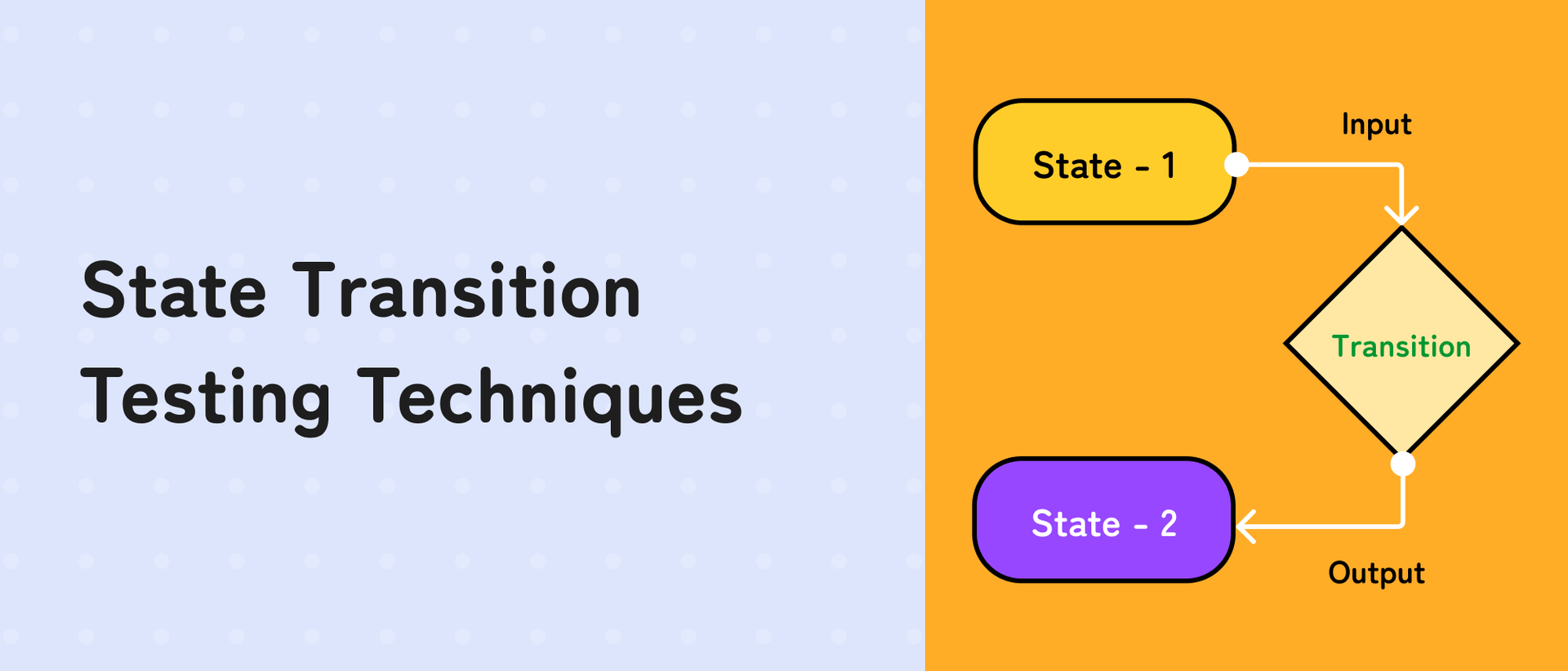
Transition: The movement from one state to another.
A transition is the process of moving from one state to another. Using our smartphone example, when you enter your passcode correctly, the system transitions from "locked" to "unlocked" state.
Each transition should be predictable and follow business rules. Understanding transitions helps testers verify that the system moves between states correctly and maintains data integrity.
Event/Input: Triggers a transition from one state to another.
Events or inputs are the triggers that cause state transitions. These could be user actions, system events, or external factors.
For example, pressing the power button (input) on your smartphone triggers a transition from "on" to "off" state. Events are critical testing points because they initiate state changes and need to be thoroughly validated.
Action/Output: The result or response due to a transition.
Actions or outputs are the system's responses when a transition occurs. When you submit a payment on an e-commerce site, the output might include a confirmation message, an email receipt, and updating the order status. Each action should be appropriate for the transition that triggered it.
Techniques for State Transition Testing
Identifying States and Transitions
In practice, the biggest mistakes I’ve seen come from missing states, not missing tests. That’s why I start by exhaustively listing every meaningful system state—even the ones that seem unlikely.
From there, mapping transitions visually and validating both valid and invalid paths helps uncover bugs that functional test cases often miss at any given moment. This involves careful analysis of the system's requirements and functionality to identify every distinct condition. Once states are mapped, define how the system can move between these states, considering valid triggers and conditions that enable these transitions.
Creating a State Transition Diagram
Transform your documented states and transitions into a visual representation. Using nodes (circles or rectangles) to represent states and directional arrows to show transitions creates a clear picture of system behavior. Understanding how a test scenario vs test case differs at this stage can also help you decide what belongs in the diagram and what should remain in detailed steps. This diagram becomes a powerful tool for understanding system flow and identifying potential gaps in transition coverage.
Sleep Easy Before Launch
We'll stress-test your app so users don't have to.
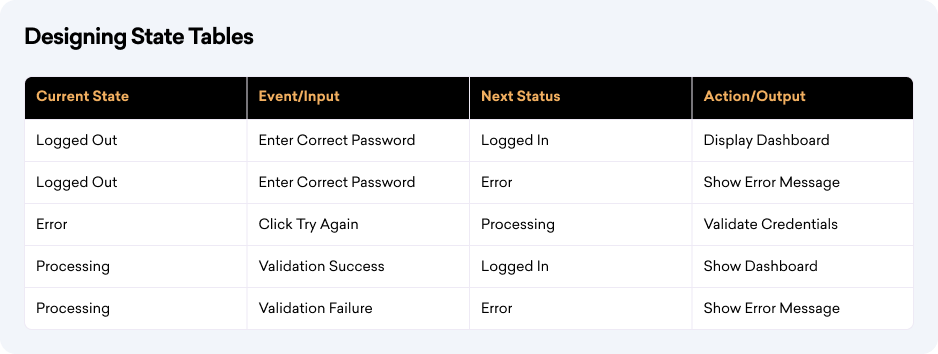
Designing State Tables
Build a structured documentation that captures every aspect of state transitions in a tabular format. This comprehensive table should include:
Validating All Paths
Execute a thorough testing strategy that covers every possible transition path. This includes testing both valid and invalid transitions to ensure the system behaves correctly in all scenarios. Focus on edge cases, unexpected inputs, and boundary conditions to validate the system's robustness and error handling capabilities. Running a quick round of smoke testing at this stage helps confirm that core functions are stable before diving into deeper state transition checks.
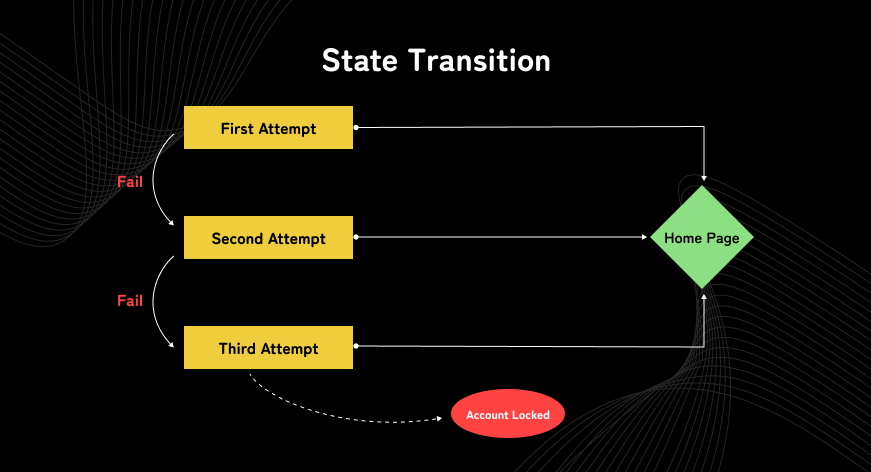
To better understand these concepts, let's look at a practical example using an ATM system:
States:
- Account Locked
- Home Page
Transitions:
- Entering correct credentials transitions from Locked to Home.
- Entering incorrect credentials remains in the Locked state.
Diagram: A state transition diagram can help visualize these scenarios. Testing such workflows often also needs complementary checks like database testing to ensure the data behind each state change remains accurate and consistent.
Benefits of State Transition Testing
Now that we've covered the basics and techniques, let's explore why state transition testing is crucial for your testing strategy

Improved Coverage
Helps achieve comprehensive test coverage by systematically examining all possible state changes. This methodical approach ensures no critical system behavior goes untested, reducing the risk of undiscovered bugs.
Early Bug Detection
Reveals critical issues during state transitions before they escalate into complex problems. This preventive approach saves time, reduces development costs, and ensures smoother deployments, and applying severity vs priority concepts here helps teams address the most impactful issues first.
Applicability
Perfectly suits complex applications where state management is crucial, from embedded systems to financial software. In practice, blending it with approaches like Gray box testing can extend coverage to areas where partial internal knowledge helps validate state changes more thoroughly. The structured nature makes it invaluable for testing mission-critical functionalities.
Tools for State Transition Testing
To make your state transition testing more efficient, here are some powerful tools you can make use of, and for post-failure categorization, consider defect root cause analysis tools.
TOSCA Testsuite
A comprehensive testing platform that automates the creation and visualization of state transition diagrams. TOSCA's intuitive interface helps teams design, execute, and maintain test cases efficiently, making it easier to track complex state changes.
Suggested Reads- Test Scenario vs Test Case (Key Differences)
GraphWalker
An open-source tool specializing in model-based testing. It generates test paths through state machines, helping testers create thorough test scenarios. GraphWalker's automation capabilities make it particularly valuable for complex state-based applications.
Spec Explorer
Microsoft's model-based testing tool excels at generating state models and validating transitions. It helps teams create precise models of system behavior and automatically generates test cases to verify state transitions.
Each tool offers unique features that can streamline your testing process and improve test coverage. Select the one that best matches your project's needs and complexity.
Challenges in State Transition Testing
While state transition testing is valuable, it's important to be aware of these common challenges
Complexity
From experience, the real challenge isn’t understanding state transition testing; it’s managing complexity as systems evolve. As new states are added, diagrams and test cases must be revisited regularly, or they quickly become outdated.
Sleep Easy Before Launch
We'll stress-test your app so users don't have to.
Keeping models lightweight and focused on business-critical flows makes this technique sustainable over time.
Maintenance
Requirements often change during development, making it challenging to keep state diagrams and test cases up-to-date. Each modification requires careful review and updates to maintain testing accuracy and effectiveness.
Managing Test Cases
As the number of states and transitions increases, managing and prioritizing test cases becomes complex. Testers must balance comprehensive coverage with practical time and resource constraints. Referring to a structured Web application testing checklist can help testers stay organized and ensure critical steps are not overlooked while handling multiple scenarios.
FAQ
What is state transition testing in software testing?
State transition testing is a black-box testing technique used to validate how a system moves between different states based on inputs or events, especially when behavior depends on previous actions.
When should state transition testing be used?
It should be used when system outputs depend on history, such as login attempts, transaction processing, workflow approvals, and session-based applications.
What are the key components of state transition testing?
The core components are states, transitions, events (inputs), and actions (outputs), which together define system behavior over time.
How is a state transition diagram used in testing?
A state transition diagram visually maps states and transitions, helping testers identify valid, invalid, and missing paths that need test coverage.
What are common challenges in state transition testing?
Common challenges include managing complexity as states grow, maintaining diagrams with changing requirements, and prioritizing test paths effectively.
Which tools support state transition testing?
Popular tools include TOSCA Testsuite, GraphWalker, and Spec Explorer, which help model states, generate paths, and automate test execution.
How does state transition testing improve test coverage?
It ensures all possible state changes, valid and invalid, are tested, uncovering edge cases that functional test cases often overlook.
Our Final Words
I’ve found that state transition testing consistently delivers value where traditional test cases fall short. It forces you to think the way real systems behave, over time, across actions, and under repeated conditions.
As applications become more state-driven, mastering this technique isn’t optional. It’s one of the most reliable ways to ensure stability, predictability, and user trust in complex software systems.

Surya
I'm a Software Tester with 5.5 years of experience, specializing in comprehensive testing strategies and quality assurance. I excel in defect prevention and ensuring reliable software delivery.