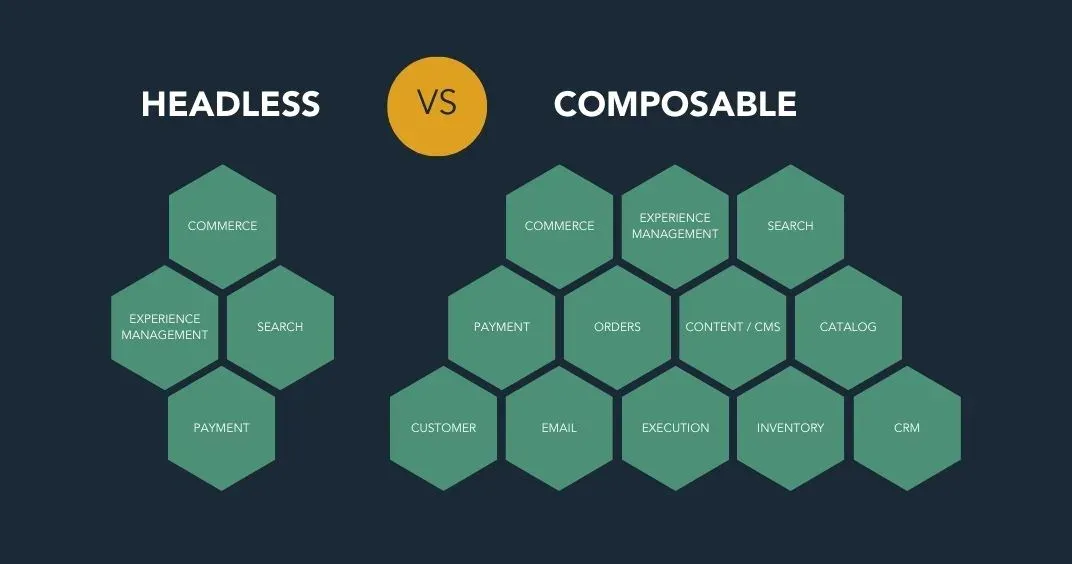
- Headless commerce separates the storefront from the core commerce platform.
- Composable commerce makes several business capabilities independently replaceable.
- Headless is usually the more focused option when the main requirement is a custom storefront.
- Composable suits organisations with complex requirements across search, content, pricing, markets, checkout or order management.
- Neither architecture guarantees better speed, SEO or faster releases; implementation quality determines the result.
- Composable commerce creates more vendor, integration, testing and observability responsibilities.
- Small and moderately complex stores may get better value from a conventional SaaS platform.
- Businesses can begin with headless commerce and modularise additional capabilities gradually.
- Choose the least complex architecture that meets your current requirements and credible growth plans.
Headless and composable commerce are frequently presented as two competing approaches. In practice, they describe different levels of architectural separation.
Headless commerce separates the customer-facing storefront from the commerce back end. Composable commerce extends modularity across more of the technology stack, allowing capabilities such as search, content management, checkout, promotions and order management to be assembled from separate components.
A composable commerce system will usually include a headless storefront, but a headless store is not necessarily fully composable.
This guide compares the two approaches, explains their costs and operational requirements, and helps you decide how much architectural flexibility your business actually needs.
What Is Headless Commerce?
Headless commerce is an e-commerce architecture in which the front-end presentation layer is separated from the back-end commerce platform.
The front end may be a website, mobile app, kiosk, marketplace interface or another customer touchpoint. It communicates with the commerce engine through APIs.
The commerce platform generally remains responsible for capabilities such as:
- Product and collection data
- Pricing
- Cart logic
- Checkout
- Customer accounts
- Payments
- Discounts
- Inventory
- Orders
Developers can build the storefront using frameworks and tools that are independent of the platform’s standard theme system.
For example, a Shopify merchant could build a custom storefront using Hydrogen or another compatible framework while Shopify remains the system of record for products, pricing, checkout and orders.
A simplified headless stack
Custom storefront
        ↓
Commerce APIs
        ↓
Central commerce platform
        ↓
Products, pricing, checkout and orders
A headless implementation may integrate a separate CMS, search tool or personalisation service. However, using several integrations does not automatically make the whole architecture composable. The central commerce platform may still control most business capabilities.
What Is Composable Commerce?
Composable commerce is an architectural approach in which a business assembles its commerce system from modular capabilities.
Instead of expecting one platform to manage nearly everything, the organisation may select separate systems for:
- Storefront
- Content management
- Product information
- Search and merchandising
- Pricing and promotions
- Cart
- Checkout
- Payments
- Customer identity
- Personalisation
- Inventory
- Order management
- Reviews
- Digital asset management
These components are sometimes described as packaged business capabilities, or PBCs. Each capability addresses a defined business function and communicates with the rest of the stack through APIs, events or an integration layer.
A simplified composable stack
Customer-facing storefronts
            ↓
API and orchestration layer
            ↓
CMS | Search | Commerce | Payments | OMS | Personalisation
The objective is not to use the largest possible number of vendors. It is to allow important capabilities to evolve or be replaced without rebuilding the entire commerce system.
Is Composable Commerce the Same as MACH?
Composable commerce and MACH are related but not identical.
MACH stands for:
- Microservices-based: Business functionality is divided into focused services.
- API-first: Capabilities expose their functionality through APIs.
- Cloud-native SaaS: Systems are designed to use cloud infrastructure and software delivery models.
- Headless: The presentation layer is separated from the underlying business logic.
MACH principles can provide a technical foundation for composable commerce. However, buying several MACH-labelled products does not guarantee a coherent composable architecture.
The organisation must still define:
- Ownership of business capabilities
- Systems of record
- Data contracts
- Integration patterns
- Failure handling
- Monitoring
- Security
- Release processes
Composability is ultimately about creating clear, independently evolvable capabilities—not accumulating disconnected services.
Composable Commerce vs Headless: Key Differences
Area | Headless commerce | Composable commerce |
Primary separation | Front end from commerce back end | Multiple business capabilities from one another |
Main objective | Customise customer-facing experiences | Customise and evolve the broader commerce stack |
Back-end model | Often one primary commerce platform | Multiple specialised platforms or services |
Storefront | Custom and API-driven | Usually custom and API-driven |
Component replacement | Mostly focused on the front end and selected integrations | Individual capabilities are designed to be replaceable |
Vendor count | Usually lower | Potentially higher |
Integration responsibility | Moderate | High |
Operational complexity | Higher than a standard platform | Usually higher than a headless platform |
Team requirements | Strong front-end and API expertise | Cross-functional platform, integration and operations expertise |
Best suited to | Differentiated storefronts and multiple customer touchpoints | Complex enterprise capabilities and organisational requirements |
Adoption approach | Can be implemented as a defined storefront project | Often implemented incrementally by business capability |
The Most Important Conceptual Difference
Headless answers this question:
Can we build and release the customer-facing experience independently of the commerce platform’s standard front end?
Composable commerce answers a broader question:
Can we select, operate and replace the business capabilities across our commerce stack independently?
This is why “headless versus composable” is not a perfect either-or decision. A company may:
- Use a conventional integrated platform
- Adopt a custom headless storefront
- Add a separate headless CMS
- Replace search with a specialist service
- Introduce an independent order-management system
- Gradually become more composable
The practical decision is therefore how much modularity the business needs and can sustain.
Advantages of Headless Commerce
Greater storefront control
Developers are not limited to the platform’s standard templates or theme architecture. They can create highly tailored product discovery, content and purchasing experiences.
Independent front-end development
The storefront team can release interface changes without modifying the underlying commerce platform, provided API contracts remain stable.
Support for multiple touchpoints
A common commerce back end can support websites, mobile apps, kiosks and other interfaces.
Freedom to select front-end tools
Teams can choose frameworks, hosting and development workflows suited to their skills and performance requirements.
Easier integration of content
A headless CMS can be combined with the commerce platform when the store requires editorial experiences beyond the native content tools.
Gradual modernisation
A business can retain its existing commerce engine while replacing an inflexible or outdated storefront.
Need Help With Shopify Development?
We build fast, custom Shopify stores designed to drive more sales.
Challenges of Headless Commerce
Higher development responsibility
The platform no longer supplies the complete storefront experience. Your team becomes responsible for building, hosting, testing, securing and maintaining it.
Preview and content-management complexity
Marketers may lose some visual editing capabilities unless the CMS and front end are carefully integrated.
More regression testing
Theme updates that would otherwise be handled by the platform may require development and testing in the custom storefront.
Integration and API limits
Storefront reliability depends on APIs, authentication, caching and third-party services. Rate limits and API changes must be managed.
Higher total cost
Headless introduces costs for development, infrastructure, monitoring, deployment and ongoing maintenance. The business case must justify these expenses.
No automatic performance advantage
A headless storefront can be fast, but it can also be slowed by poor rendering decisions, excessive JavaScript, uncached API calls or too many third-party scripts.
Advantages of Composable Commerce
Capability-level flexibility
Teams can select specialised systems for business functions where a general-purpose platform is insufficient.
Incremental replacement
An organisation can replace a search, CMS or personalisation component without necessarily replacing the entire commerce platform.
Independent scaling
Capabilities with different traffic and processing requirements can be scaled separately when the architecture and vendors support it.
Reduced dependence on one platform roadmap
The business is not entirely constrained by what one vendor chooses to build or prioritise.
Support for complex operating models
Composable architecture can accommodate multiple brands, catalogues, regions, fulfilment models and customer types when a single platform cannot model them effectively.
Clearer capability ownership
Well-designed boundaries can allow different teams to own search, checkout, content or order management without deploying the entire platform together.
Challenges of Composable Commerce
Integration becomes a product
The connections between components must be designed, built, monitored and maintained. Integration is not a one-time implementation task.
Distributed data ownership
The business must determine which system owns products, prices, customers, inventory, promotions and orders. Conflicting systems of record can produce serious errors.
More failure points
A customer journey may rely on several services. Search, pricing, inventory or personalisation failures can affect the storefront even when the commerce platform remains available.
Vendor coordination
Different providers may have separate contracts, pricing models, support processes, release schedules and service-level commitments.
Complex testing
Teams must test complete business journeys across component boundaries, including failures, retries, delayed events and inconsistent data.
Greater observability requirements
Monitoring one application is no longer sufficient. Teams need end-to-end tracing, centralised logging, alerting and clear ownership of incidents.
Potentially unpredictable costs
API usage, search volume, content delivery, infrastructure, middleware and vendor subscriptions can make the total cost difficult to estimate.
Risk of unnecessary complexity
A business can overengineer a straightforward store by choosing specialised services for capabilities that its primary platform already handles adequately.
Does Headless or Composable Commerce Improve Performance?
Neither architecture is automatically faster.
A headless or composable storefront can improve performance when teams use:
- Server-side or edge rendering
- Effective caching
- Optimised images
- Minimal client-side JavaScript
- Efficient API requests
- Geographic content delivery
- Graceful fallbacks
- Strong monitoring
Performance can deteriorate when a page waits for several services, loads too much JavaScript or makes sequential API requests.
Composable commerce introduces another consideration: the storefront may depend on content, search, pricing, inventory and personalisation services before it can render. An orchestration layer, caching strategy and resilience plan become essential.
Performance should be validated with prototypes and real user monitoring rather than assumed from the architecture label.
Does Headless or Composable Commerce Improve SEO?
Both approaches can provide extensive control over:
- Metadata
- Structured data
- Internal linking
- Canonical tags
- Redirects
- International URLs
- Rendering
- Page templates
- Core Web Vitals
However, they also transfer more SEO responsibility to the implementation team.
Common risks include:
- Client-side-only rendering
- Missing canonical tags
- Incomplete XML sitemaps
- Incorrect hreflang implementation
- Broken redirects
- Duplicate product URLs
- Slow pages
- Inconsistent structured data
- CMS pages unavailable to crawlers
A conventional platform may provide many of these controls by default. With a custom storefront, the team must deliberately recreate and test them.
Headless vs Composable Commerce: Cost Comparison
The licence price alone does not represent the cost of either architecture.
Evaluate total cost across:
Cost area | Headless | Composable |
Custom storefront development | High | High |
Integration development | Moderate to high | High |
Number of vendor contracts | Usually lower | Usually higher |
Hosting and infrastructure | Additional | Additional |
Monitoring and observability | Required | More extensive |
Quality assurance | Higher than conventional commerce | Highest across component boundaries |
Ongoing engineering | Significant | Significant |
Vendor replacement | Front end is easier to replace | Individual capabilities may be easier to replace |
Governance | Moderate | High |
Composable commerce can reduce the cost of replacing a particular capability later, but only if boundaries and integrations were designed well. Poorly integrated components can create a different form of lock-in around custom middleware.
Choose Headless Commerce If
Headless may be appropriate when:
- Your main constraint is the storefront experience.
- Your current commerce back end meets operational requirements.
- You need several customer-facing channels.
- Content and commerce require a more customised presentation.
- Your brand depends on frequent front-end experimentation.
- Your team can maintain a custom application.
- Platform themes cannot support your required experience.
- You want to modernise the storefront without replacing core commerce operations.
A headless build is often the more controlled first step when the business needs custom presentation but does not need to disassemble the entire back end.
Choose Composable Commerce If
Composable commerce may be appropriate when:
- Several parts of the existing platform restrict the business.
- You need specialised search, pricing, promotions or order orchestration.
- Different brands or regions require distinct capabilities.
- Teams need to release business functions independently.
- You need to replace components without recurring full-platform migrations.
- The organisation has mature API and integration practices.
- You can operate several critical vendors and services.
- The expected business value justifies the additional complexity.
Composable commerce is generally better suited to organisations with specific requirements that a central platform cannot meet—not organisations seeking flexibility as an abstract goal.
Stay with a Conventional Platform If
A traditional or integrated SaaS platform may still be the better decision when:
- The standard storefront meets customer needs.
- The store has relatively straightforward products and fulfilment.
- Speed of launch is more important than architectural control.
- The internal engineering team is small.
- The business does not need specialised back-end capabilities.
- Platform apps can address genuine gaps safely.
- Maintenance cost must remain predictable.
Choosing a conventional platform is not a sign that the business lacks technical ambition. It can be the strongest architectural decision when additional complexity would not produce proportional customer or operational value.
A Practical Decision Framework
Evaluate the architectures across six areas.
1. Business differentiation
Which capabilities genuinely differentiate the business?
If differentiation is mainly visual or experiential, headless may be sufficient. If pricing, merchandising, fulfilment or multi-market operations are also distinctive, a more composable model may be justified.
2. Current platform limitations
Document concrete limitations rather than general dissatisfaction.
Examples include:
- A required experience cannot be created.
- Search cannot support the catalogue.
- Promotion rules cannot model the business.
- Order routing cannot support fulfilment operations.
- Releases are blocked by tightly coupled systems.
3. Team maturity
Assess whether the organisation can operate:
- APIs
- Cloud infrastructure
- Continuous delivery
- Automated testing
- Monitoring and alerting
- Security controls
- Data governance
- Vendor management
- On-call incident response
Need Help With Shopify Development?
We build fast, custom Shopify stores designed to drive more sales.
The architecture should match the team that will maintain it after launch.
4. Time and budget
Include discovery, migration, integration, testing, content modelling, analytics, SEO, training and post-launch support.
Do not compare a composable programme only with the licence cost of the existing platform.
5. Migration risk
Consider:
- Product and customer migration
- Order history
- Search indexing
- Redirects
- Analytics continuity
- Payment and tax integrations
- Peak trading periods
- Rollback options
6. Expected return
Connect each architectural change to a measurable outcome, such as:
- Faster release cycles
- Reduced platform fees
- Improved conversion
- Expansion into new markets
- Lower operational effort
- Better search performance
- Fewer manual order processes
If the expected benefit cannot be defined, the architecture may be solving a technology preference rather than a business problem.
How to Implement Headless Commerce
1. Define the reason for going headless
Identify the experiences or channels that the current storefront cannot support.
2. Retain or select the commerce back end
Confirm that its APIs cover products, pricing, inventory, carts, customers, checkout and orders.
3. Choose the storefront architecture
Select the framework, rendering model, hosting environment and content system based on team capability and performance requirements.
4. Design API and caching behaviour
Determine how the storefront retrieves data, handles failures, caches responses and keeps prices and inventory current.
5. Plan operational requirements
Include analytics, SEO, previewing, monitoring, security, deployments and incident response.
6. Build and test complete journeys
Test browsing, search, cart, checkout, payments, discounts, customer accounts, refunds and order tracking across devices and markets.
7. Launch with monitoring
Track conversion, errors, API latency, Core Web Vitals and failed customer journeys after release.
How to Implement Composable Commerce
1. Map business capabilities
Document the functions required across discovery, purchase, payment, fulfilment and service.
2. Identify the systems of record
Assign ownership for products, pricing, inventory, customers, promotions and orders.
3. Choose components based on requirements
Evaluate API coverage, extensibility, uptime, data portability, documentation, regional support and total cost, not merely feature lists.
4. Design the integration layer
Define synchronous APIs, asynchronous events, identity, security, error handling, retries and data reconciliation.
5. Establish observability
Create end-to-end monitoring so teams can identify which component caused a customer journey to fail.
6. Migrate incrementally
Replace a constrained capability first instead of rebuilding the entire stack simultaneously. Suitable starting points may include content, search or the storefront.
7. Test failure scenarios
Verify how the system behaves when search, personalisation, inventory or another service becomes slow or unavailable.
8. Review component value regularly
A composable component should remain because it delivers business value, not simply because it was included in the original architecture.
Can You Move from Headless to Composable Commerce?
Yes. For many businesses, gradual evolution is safer than a complete rebuild.
A possible progression is:
- Retain the core commerce platform.
- Build a headless storefront.
- Introduce a headless CMS.
- Replace search if the native capability becomes restrictive.
- Add a dedicated product information or order-management system.
- Modularise other capabilities only when there is a clear need.
This approach allows the organisation to build operational experience while limiting migration risk.
However, every new component should have clear ownership and measurable value. Gradual adoption should not become uncontrolled accumulation.
Frequently Asked Questions
What is the main difference between headless and composable commerce?
Headless separates the customer-facing storefront from the commerce back end. Composable commerce goes further by dividing capabilities such as search, content, payments and order management into independently managed components.
Is composable commerce always headless?
Composable commerce usually uses a headless presentation layer because independent front ends are central to modular delivery. However, headless alone does not make the search, checkout, content and operational systems composable.
Is composable commerce more expensive than headless?
Composable commerce generally requires more integration, vendor management, testing and monitoring. It may reduce future replacement costs, but savings depend on clear component boundaries and a disciplined implementation rather than composability alone.
Can small businesses use composable commerce?
They can, but most small stores do not need its operational complexity. A conventional SaaS platform or focused headless implementation often delivers better value unless the business has unusually specialised requirements.
Is headless commerce faster than traditional ecommerce?
Not automatically. Headless provides greater control over rendering and caching, but poor API design, excessive JavaScript and third-party dependencies can produce a storefront slower than a well-optimised conventional theme.
Does composable commerce prevent vendor lock-in?
It can reduce reliance on one platform, but it does not eliminate lock-in. Proprietary APIs, data models, middleware and custom integrations can make individual components expensive to replace.
Can Shopify support headless and composable commerce?
Yes. Shopify can provide the commerce back end for a custom storefront through its APIs and headless tools. It can also participate in a broader stack containing external content, search and operational systems.
Should we replace our entire platform to become composable?
Usually not. Begin with the capability creating the clearest business constraint, establish reliable integration and measure the result before replacing additional parts of the commerce stack.
Conclusion: Which Is Better?
Neither approach is universally better.
Choose headless commerce when the central commerce platform still serves the business well but the storefront or customer channels require greater control.
Choose composable commerce when several business capabilities require independent selection, scaling or replacement—and when the organisation can manage the resulting integration and operational complexity.
For many companies, the strongest path is incremental: keep the capabilities that work, adopt a headless storefront where it creates value and introduce additional components only when a clear business requirement justifies them.
The right architecture is not the one with the most flexibility. It is the least complex architecture capable of supporting the experiences, operations and growth the business genuinely needs.